

Worktree vs stash
TL;DR: The 30-Second Summary
`git stash` is designed for quick temporary shelves, but using it for multitasking leads to lost untracked files, forgotten stashes, and brutal merge conflicts on `stash pop`. Git worktrees let you leave your uncommitted work exactly where it is.
The Real-Life Scenario
“A developer has 12 uncommitted files and runs `git stash` to review a PR. Two days later, after several commits on main, she runs `git stash pop`. Git explodes with merge conflicts across 8 files, including untracked build artifacts that were deleted.”
Every Git developer has experienced the dread of `git stash pop` failing with conflicts. While `git stash` is fine for quickly stashing a one-line typo fix, using it to manage parallel tasks is a recipe for lost work.
Why Git Stash is Dangerous for Multitasking
A stash is an unreferenced commit pair stored in `.git/refs/stash`. If the branch state advances while your work is stashed, popping that stash applies changes against a different commit baseline, causing merge conflicts.
What you see in the terminal:
$ git stash pop
Auto-merging src/index.ts
CONFLICT (content): Merge conflict in src/index.ts
The stash entry is kept in case you need it.Under the Hood: Git Plumbing & Architecture
Worktrees avoid this completely because your uncommitted files remain physically on disk in their original directory. No stash commits are created, and no three-way merge is required.
Quick Command Recipes
Copy and adapt these commands directly in your terminal:
Instead of git stash, add a worktree
Leaves your dirty working tree 100% untouched.
git worktree add ../quick-fix -b fix/urgent mainList stashes globally
Stashes are shared across worktrees if you ever need them.
git stash listStep-by-Step Practical Walkthrough
Follow these verified steps to safely resolve the issue and guarantee that your filesystem and Git references are in sync.
Leave your dirty files alone
Don't run git stash. Simply open a terminal or WorktreeWise.
Create worktree for the interruption
Handle the PR or hotfix in the new directory.
git worktree add ../review -b review/pr-42 mainReturn to your original work
Simply switch back to your original window. Everything is exactly as you left it.
Comparative Feature Matrix
| Criterion | Git Stash | Git Worktree |
|---|---|---|
| State Storage | Serialized in `.git/refs/stash` | Real files live on disk |
| Risk of Conflicts | High (on stash pop) | Zero (no pop required) |
| Untracked Files | Must pass `-u` or they get left behind | Preserved natively in directory |
| Dev Server Impact | Server restarts / compiles on pop | Server stays running smoothly |
Edge Cases & Advanced Scenarios
Transferring changes between worktrees
You CAN use stash to intentionally move WIP changes between worktrees (`git stash` in WT 1, `git stash pop` in WT 2).
Common Mistakes to Avoid
❌ Mistake: Accumulating 20+ stashes over months ('WIP', 'WIP 2', 'save')
Why it causes trouble: Impossible to remember what code is in each stash.
What to do instead: Use named branches and worktrees.
Verification Checklist
- ✓Zero stashes are left lingering in `git stash list`
- ✓Uncommitted work is always safe in its own folder
Senior Engineering Tips
- ★In WorktreeWise, you can see uncommitted modifications across all worktrees at a glance without ever touching git stash.
Key Takeaways
- 01.Git worktrees eliminate stash pop conflicts completely.
- 02.Keep uncommitted work safe on disk in its original folder.
- 03.Reserve `git stash` only for 10-second typo fixes.
How WorktreeWise Solves This Visually
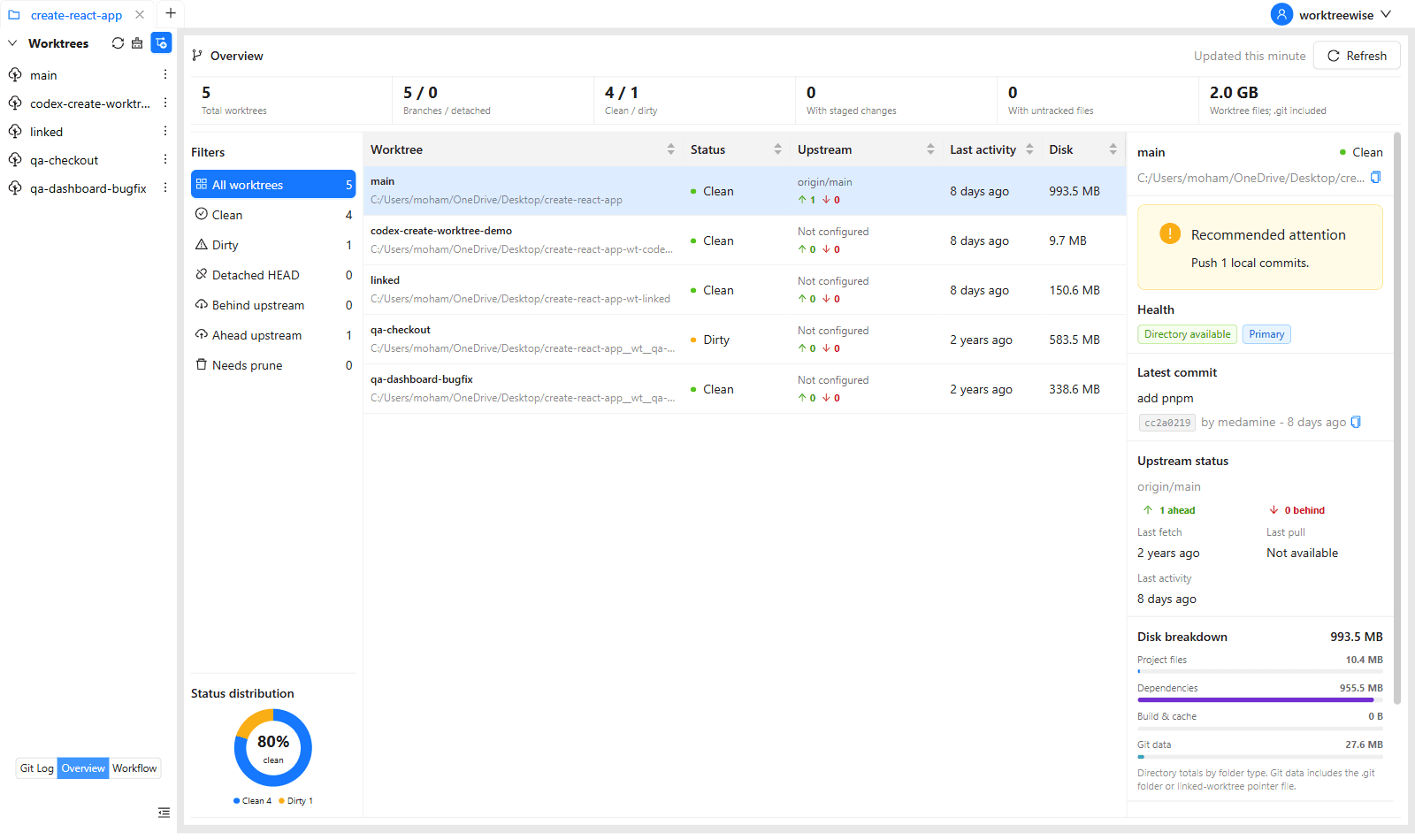
WorktreeWise eliminates the manual friction and mental overhead of CLI flags. It displays real-time branch states, uncommitted modifications, active terminals, and lock statuses across all worktrees on a single visual dashboard.
WorktreeWise Engineering Publication
Written and curated by the core WorktreeWise team. We build developer tools that turn Git worktrees, workflows, and parallel AI coding agents into second nature.