

Worktree vs branch switching
TL;DR: The 30-Second Summary
Switching branches in a single directory forces you to stash uncommitted work, triggers full compiler rebuilds, restarts dev servers, and causes editor buffer churn. Git worktrees give each branch its own directory, eliminating context switching penalties forever.
The Real-Life Scenario
“Midway through a complex UI refactor with 14 modified files, an urgent production hotfix arrives. Instead of `git stash`, switching branches, rebuilding, and risking stash pop merge conflicts, the developer creates a worktree for the hotfix in 1 second, fixes it, and returns to their undisturbed main editor.”
Branch switching has been the default workflow for Git users for decades. But in the era of heavy JavaScript compilers, TypeScript language servers, and multi-gigabyte build artifacts, repeatedly switching branches in a single directory wastes hours of engineering time.
The High Cost of Branch Switching in One Directory
When you switch branches, Git replaces thousands of files on disk. This forces TypeScript to re-index, webpack to invalidate build caches, and node_modules to mismatch.
What you see in the terminal:
$ git checkout hotfix
error: Your local changes to the following files would be overwritten by checkout:
  src/components/Table.tsx
Please commit your changes or stash them before you switch branches.Under the Hood: Git Plumbing & Architecture
A worktree provides an independent directory for the second branch. The original directory, uncommitted files, running dev server, and editor tabs remain 100% frozen in place.
Quick Command Recipes
Copy and adapt these commands directly in your terminal:
Traditional painful branch switch
The legacy multi-step workflow fraught with risk.
git stash -u
git checkout hotfix
# fix bug and commit...
git checkout feature
git stash pop # hope for no merge conflicts!
The Worktree way
Zero interruption to ongoing feature work.
git worktree add ../hotfix hotfix
# fix bug, commit, and close window. Main work never moved!Step-by-Step Practical Walkthrough
Follow these verified steps to safely resolve the issue and guarantee that your filesystem and Git references are in sync.
Leave your feature untouched
Keep your editor, terminal, and running server open on `main`.
Add worktree for hotfix
Opens a fresh directory.
git worktree add ../hotfix -b hotfix/urgent mainResolve hotfix in isolation
Write fix, commit, and push from `../hotfix`.
Remove worktree when done
Cleanup takes 1 second.
git worktree remove ../hotfixComparative Feature Matrix
| Aspect | Traditional Branch Switching | Git Worktrees |
|---|---|---|
| Uncommitted Work | Must stash or commit WIP | Untouched and frozen in place |
| Dev Server State | Crashes or requires full restart | Stays running without interruption |
| Build Cache | Invalidated and recompiled | Preserved per directory |
| IDE Tabs & Cursor | All open files close or reload | Separate windows stay exactly as left |
| Risk of Lost Work | High (stash drop/pop conflicts) | Zero (nothing is stashed) |
Edge Cases & Advanced Scenarios
Quick 10-second inspection
For reading a single commit message or viewing a diff, `git log` or `git show` is fine without a worktree.
Common Mistakes to Avoid
❌ Mistake: Forgetting you have work stashed in a single-checkout workflow
Why it causes trouble: Weeks later, `git stash pop` fails with catastrophic merge conflicts.
What to do instead: Use worktrees instead of stashing.
Verification Checklist
- ✓Your ongoing feature work is never stashed or modified
- ✓Dev server continues running without rebuild delay
Senior Engineering Tips
- ★Once developers adopt worktrees for hotfixes and code reviews, they almost never use `git stash` again.
Key Takeaways
- 01.Worktrees eliminate stash anxiety and compilation invalidation.
- 02.Your running dev servers and editor buffers never get interrupted.
- 03.Switching contexts is as simple as switching desktop windows.
How WorktreeWise Solves This Visually
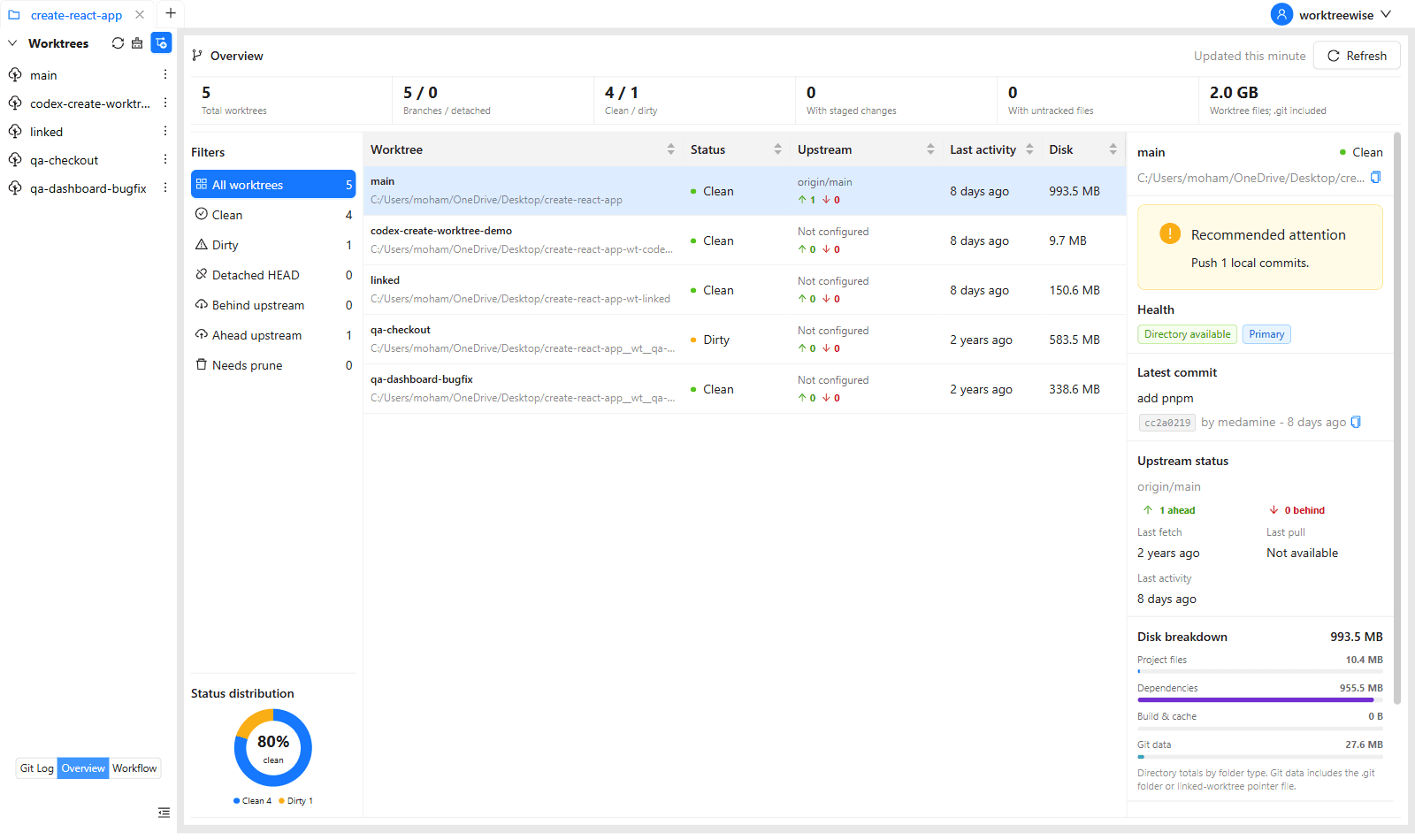
WorktreeWise eliminates the manual friction and mental overhead of CLI flags. It displays real-time branch states, uncommitted modifications, active terminals, and lock statuses across all worktrees on a single visual dashboard.
WorktreeWise Engineering Publication
Written and curated by the core WorktreeWise team. We build developer tools that turn Git worktrees, workflows, and parallel AI coding agents into second nature.