

Worktree is stale
TL;DR: The 30-Second Summary
Stale worktrees are registered checkouts whose folders have been moved, deleted, or left behind by automated CI/CD and AI agent jobs. Audit with `git worktree list --porcelain`, lock active temporary trees, and prune stale records with `git worktree prune`.
The Real-Life Scenario
“A developer notices their branch list is cluttered with dozens of `agent/task-*` branches that cannot be deleted. Over the past week, automated scripts spawned temporary worktrees but crashed before running the cleanup routine.”
In fast-paced development environments—especially when using autonomous AI coding agents, preview test builds, and local CI scripts—worktrees are frequently created dynamically. When those processes fail or exit unexpectedly, stale metadata accumulates.
The Problem with Stale Worktrees
Stale worktrees consume metadata space in `.git/worktrees/`, keep branch references locked, and cause confusing errors when new tasks attempt to reuse branch or directory names.
What you see in the terminal:
$ git worktree list
/home/dev/main           04e3a1f [main]
/home/dev/agent-run-102  a3f81e2 [agent/task-102] (prunable)
/home/dev/agent-run-103 b19cc41 [agent/task-103] (prunable)Under the Hood: Git Plumbing & Architecture
Git maintains an internal timer for prunable worktrees governed by `gc.worktreePruneExpire` (default is 14 days). Until that expiration window passes or an explicit `git worktree prune` is executed, Git keeps the metadata intact in case the drive is temporarily offline.
Quick Command Recipes
Copy and adapt these commands directly in your terminal:
List all stale and prunable worktrees
Prints detailed status including whether the worktree is missing or locked.
git worktree list -vForce immediate prune of all stale entries
Overrides the 14-day grace period and prunes missing worktrees immediately.
git worktree prune --expire=now -vStep-by-Step Practical Walkthrough
Follow these verified steps to safely resolve the issue and guarantee that your filesystem and Git references are in sync.
Audit existing worktrees
Inspect the list of active and stale worktrees across your repository.
git worktree list/repos/main 04e3a1f [main] /repos/temp-run-01 c912e88 [temp-run-01] (prunable)
Clean up with explicit expiration
Run prune with `--expire=now` to clean up without waiting for the default 14-day timeout.
git worktree prune --expire=now -vRemoving worktrees/temp-run-01: gitdir points to non-existent location
Delete orphaned branches
Now that the worktrees are pruned, delete any leftover temporary branches.
git branch -D temp-run-01Deleted branch temp-run-01 (was c912e88).
Edge Cases & Advanced Scenarios
Locked worktrees will NOT be pruned
If a stale worktree was previously locked, prune will intentionally skip it. Unlock it first with `git worktree unlock`.
git worktree unlock /path/to/stale-worktreeCommon Mistakes to Avoid
❌ Mistake: Relying on automatic garbage collection (`git gc`) alone
Why it causes trouble: Git gc respects the 14-day prune grace period, meaning stale branches stay locked for two full weeks.
What to do instead: Run `git worktree prune --expire=now` during maintenance.
Verification Checklist
- ✓`git worktree list` contains only active, existing folders
- ✓Stale branches can be deleted cleanly without checkout collision errors
Senior Engineering Tips
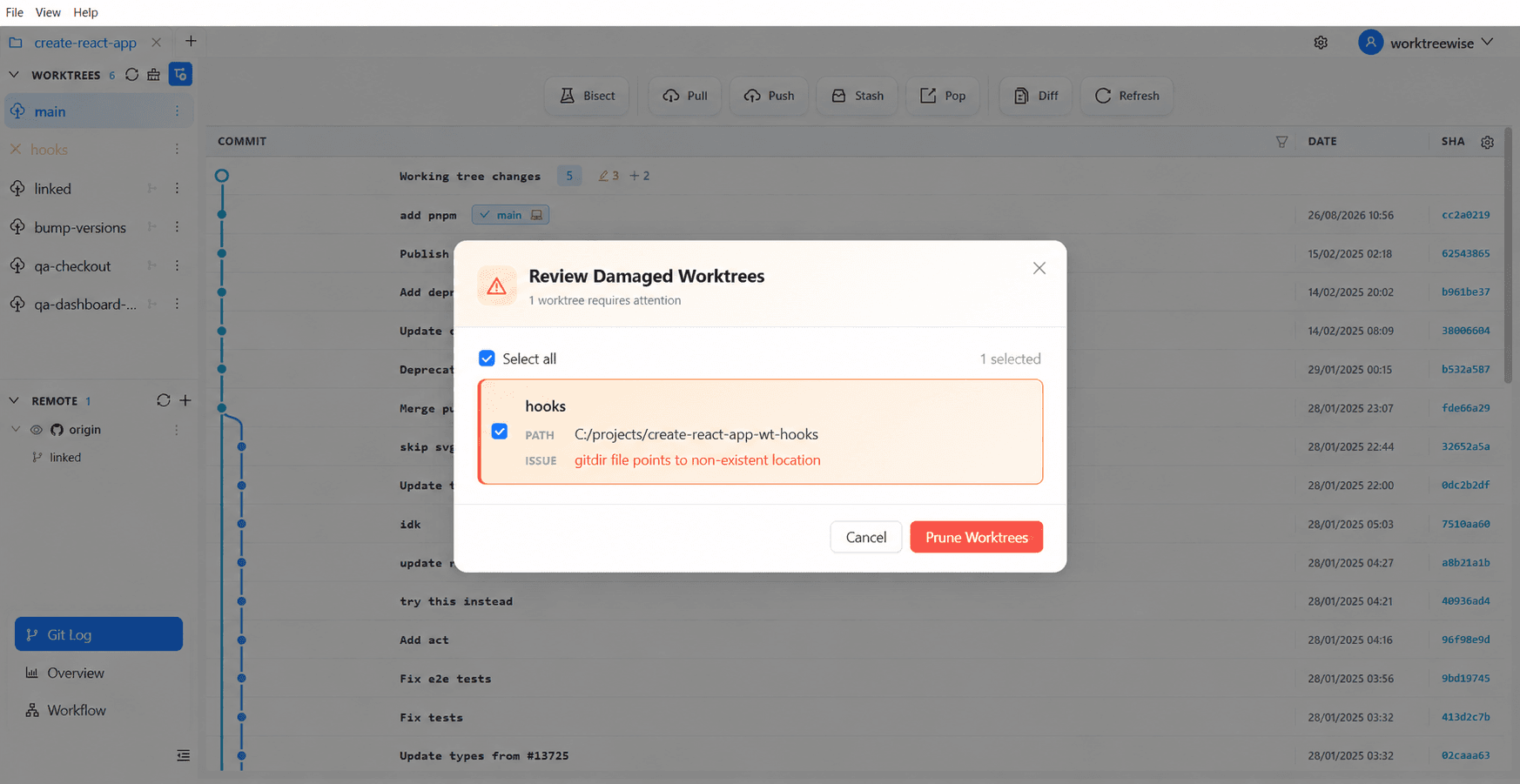
- ★WorktreeWise includes a Prune Manager that visually flags stale and prunable worktrees with their age, allowing one-click cleanup.
Key Takeaways
- 01.Stale worktrees are registered checkouts whose folders no longer exist on disk.
- 02.Use `git worktree prune --expire=now` to force immediate cleanup.
- 03.Locked worktrees are protected from pruning until explicitly unlocked.
How WorktreeWise Solves This Visually
WorktreeWise eliminates the manual friction and mental overhead of CLI flags. It displays real-time branch states, uncommitted modifications, active terminals, and lock statuses across all worktrees on a single visual dashboard.
WorktreeWise Engineering Publication
Written and curated by the core WorktreeWise team. We build developer tools that turn Git worktrees, workflows, and parallel AI coding agents into second nature.