

Worktree is not a Git repository
TL;DR: The 30-Second Summary
Linked worktrees contain a special `.git` file (not a folder) that points back to the main repository's `.git/worktrees/<name>` directory. If the main repo or worktree was moved, renamed, or restored from backup, this link breaks. Fix it by editing the `.git` pointer file or running `git worktree repair`.
The Real-Life Scenario
“An engineer copies their development directory to a new NVMe drive (`D:\Projects` to `E:\Projects`). When opening their secondary worktree in terminal and typing `git status`, Git responds: `fatal: not a git repository (or any of the parent directories): .git`.”
Unlike the primary checkout which contains a `.git/` folder holding the entire object database and reflog, a secondary Git worktree only contains a single text file named `.git`. If the pointer path inside that text file becomes invalid, Git fails to recognize the entire folder as a repository.
How the `.git` Pointer File Breaks
When you inspect `.git` in a worktree, you'll see a single line: `gitdir: /path/to/main/.git/worktrees/<id>`. If the main repository is relocated, the worktree folder is renamed, or disk drive letters change on Windows, the stored absolute path points into the void.
What you see in the terminal:
$ cd /projects/feature-billing
$ git status
fatal: not a git repository (or any of the parent directories): .gitUnder the Hood: Git Plumbing & Architecture
Git worktree links are strictly bidirectional. The worktree contains `.git` pointing to `.git/worktrees/<id>/gitdir`. Inside `.git/worktrees/<id>/`, there is a file named `gitdir` pointing right back to the worktree's `.git` file, plus a `commondir` pointing to the main `.git/` directory. When either path breaks, Git's discovery algorithm (`setup_git_directory_gently`) aborts.
Quick Command Recipes
Copy and adapt these commands directly in your terminal:
Check the contents of the worktree's .git file
Reads the pointer line to see what invalid or stale path Git is currently trying to follow.
cat .gitRepair automatically from the main repository
Recomputes and rewrites both sides of the bidirectional pointer link.
git worktree repair /path/to/broken-worktreeManual fix by updating .git file directly
Directly restores the correct gitdir reference when automated tools cannot locate the main repository.
echo "gitdir: /new/path/to/main/.git/worktrees/feature-billing" > .gitStep-by-Step Practical Walkthrough
Follow these verified steps to safely resolve the issue and guarantee that your filesystem and Git references are in sync.
Verify whether .git is a file or a folder
Open the broken worktree directory and inspect the `.git` entry.
ls -la .git-rw-r--r-- 1 dev staff 64 Sep 5 10:15 .git
Print the current stale pointer path
Inspect where the pointer file thinks the main repository lives.
cat .gitgitdir: /old/drive/projects/my-repo/.git/worktrees/feature-billing
Run git worktree repair from the main repository
Navigate to the main repository where the primary `.git/` folder resides, and run repair pointing to the broken worktree directory.
git worktree repair /new/drive/projects/my-repo-billingrepair worktree: /new/drive/projects/my-repo-billing
Confirm git status functions normally again
Switch back into the worktree directory and test Git commands.
git -C /new/drive/projects/my-repo-billing statusOn branch feature-billing Your branch is up to date with 'origin/feature-billing'. nothing to commit, working tree clean
Edge Cases & Advanced Scenarios
Windows drive letter reassignment (C: to D:)
On Windows, USB drives or partition resizes change drive letters. Run `git worktree repair` from the new root, or use relative paths if supported.
git worktree repair D:\Projects\my-worktreeMain repository .git/worktrees/ folder was deleted
If the administrative folder inside `.git/worktrees/` was accidentally wiped, the worktree cannot be repaired. Commit your changes as a patch, delete the worktree, and create a fresh one.
git diff > ../my-changes.patchCommon Mistakes to Avoid
❌ Mistake: Running `git init` inside the broken worktree directory
Why it causes trouble: Creates a nested second repository, overwriting the `.git` pointer and severing the link to the main project history.
What to do instead: Never run `git init` inside an existing worktree. Use `git worktree repair`.
❌ Mistake: Copy-pasting worktrees across network drives without repairing
Why it causes trouble: Network share paths differ between host machines, causing all Git operations to fail for other developers.
What to do instead: Keep worktrees on local fast NVMe storage and repair paths after machine migrations.
Verification Checklist
- ✓The `.git` file points to an existing directory inside `.git/worktrees/`
- ✓`git rev-parse --is-inside-work-tree` returns `true`
- ✓`git log -n 1` shows the latest commit correctly
Senior Engineering Tips
- ★Git 2.30+ introduced `git worktree repair`, which automatically resolves both forward and backward pointer breakages in a single command.
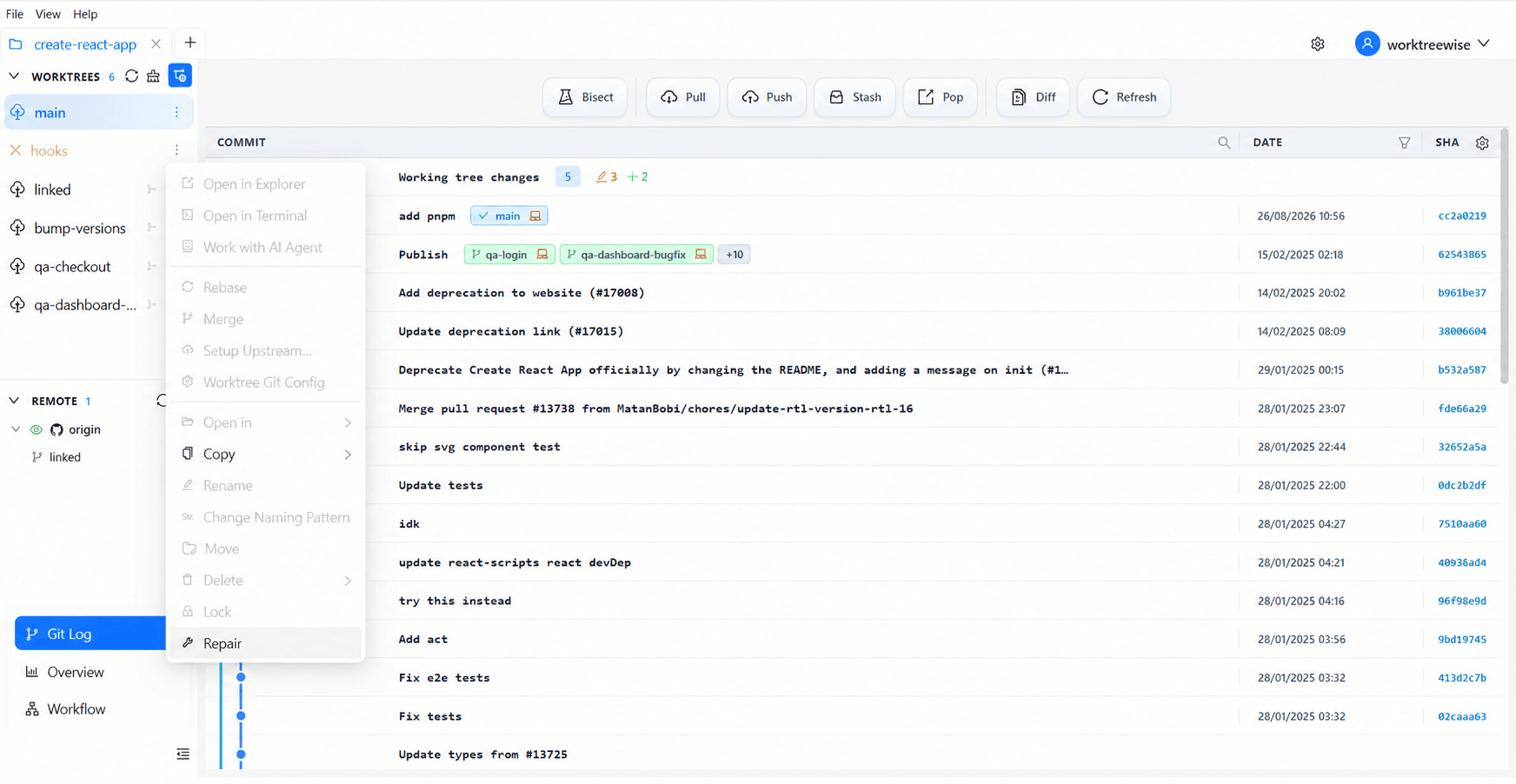
- ★WorktreeWise automatically detects broken worktree links on startup and offers a one-click repair dialog.
Key Takeaways
- 01.Linked worktrees use a `.git` text pointer file, not a full `.git/` folder.
- 02.Moving folders or changing drive letters invalidates the stored absolute path.
- 03.`git worktree repair <path>` is the fastest and safest fix.
How WorktreeWise Solves This Visually
WorktreeWise eliminates the manual friction and mental overhead of CLI flags. It displays real-time branch states, uncommitted modifications, active terminals, and lock statuses across all worktrees on a single visual dashboard.
WorktreeWise Engineering Publication
Written and curated by the core WorktreeWise team. We build developer tools that turn Git worktrees, workflows, and parallel AI coding agents into second nature.