

Missing worktree directory
TL;DR: The 30-Second Summary
When a worktree directory is deleted outside Git (via File Explorer, Finder, or `rm -rf`), Git continues to track it as an active checkout. This prevents other checkouts of its branch. Clean up the zombie record using `git worktree prune --dry-run` followed by `git worktree prune`.
The Real-Life Scenario
“A teammate deletes a temporary worktree folder using macOS Finder. Later, when trying to delete the merged feature branch, Git refuses because it still considers the branch actively checked out in the deleted path.”
Git does not continuously monitor your filesystem in the background. If a folder is deleted through your desktop environment or terminal without telling Git, the administrative records inside `.git/worktrees/` remain active. Git considers the worktree alive—just missing from disk.
Ghost Worktrees and Branch Locks
When you run `git worktree list`, missing folders appear marked as `prunable` or missing. Even though the files are gone, the branch attached to that worktree cannot be deleted, checked out elsewhere, or re-created until Git prunes its record.
What you see in the terminal:
$ git worktree list
/repos/main           04e3a1f [main]
/repos/feature-login  18c42bb [feature-login] (prunable)

$ git branch -d feature-login
error: Cannot delete branch 'feature-login' checked out at '/repos/feature-login'Under the Hood: Git Plumbing & Architecture
Git stores the registered worktree in `.git/worktrees/<name>/`. Because the branch reference in `.git/refs/heads/` is still bound to the worktree's `HEAD`, any command that modifies the branch fails with a safety lock until the administrative folder is pruned.
Quick Command Recipes
Copy and adapt these commands directly in your terminal:
Check for missing and prunable worktrees
Shows all registered worktrees and flags missing ones with (prunable).
git worktree list -vPreview what will be pruned
Lists the exact metadata folders that will be deleted without touching real data.
git worktree prune --dry-run --verboseClean up missing worktrees
Safely removes administrative records for directories that no longer exist on disk.
git worktree prune -vStep-by-Step Practical Walkthrough
Follow these verified steps to safely resolve the issue and guarantee that your filesystem and Git references are in sync.
List worktrees to find missing entries
Run the verbose list command to identify which directory was deleted.
git worktree list -v/repos/main 04e3a1f [main] /repos/feature-login 18c42bb [feature-login] prunable (gitdir points to non-existent location)
Dry run the prune command
Always verify what Git plans to prune to avoid accidentally retiring locked or temporarily unmounted drives.
git worktree prune --dry-run -vRemoving worktrees/feature-login: gitdir points to non-existent location
Execute the prune operation
Run `git worktree prune` to purge the orphaned administrative metadata.
git worktree prune -vRemoving worktrees/feature-login
Verify the branch is now unlocked
Confirm that the branch can now be safely checked out or deleted.
git branch -d feature-loginDeleted branch feature-login (was 18c42bb).
Edge Cases & Advanced Scenarios
Worktree directory is on an unmounted external drive
If your worktree resides on a flash drive or external SSD that is unplugged, pruning will permanently retire its registration. Lock external worktrees before disconnecting them!
git worktree lock --reason 'external drive' /media/ssd/worktreeCommon Mistakes to Avoid
❌ Mistake: Manually deleting folders inside `.git/worktrees/`
Why it causes trouble: Risk deleting active metadata, causing corrupted repository states.
What to do instead: Always let `git worktree prune` handle cleanup.
Verification Checklist
- ✓`git worktree list` displays only existing filesystem paths
- ✓The associated branch is released and can be deleted or checked out elsewhere
Senior Engineering Tips
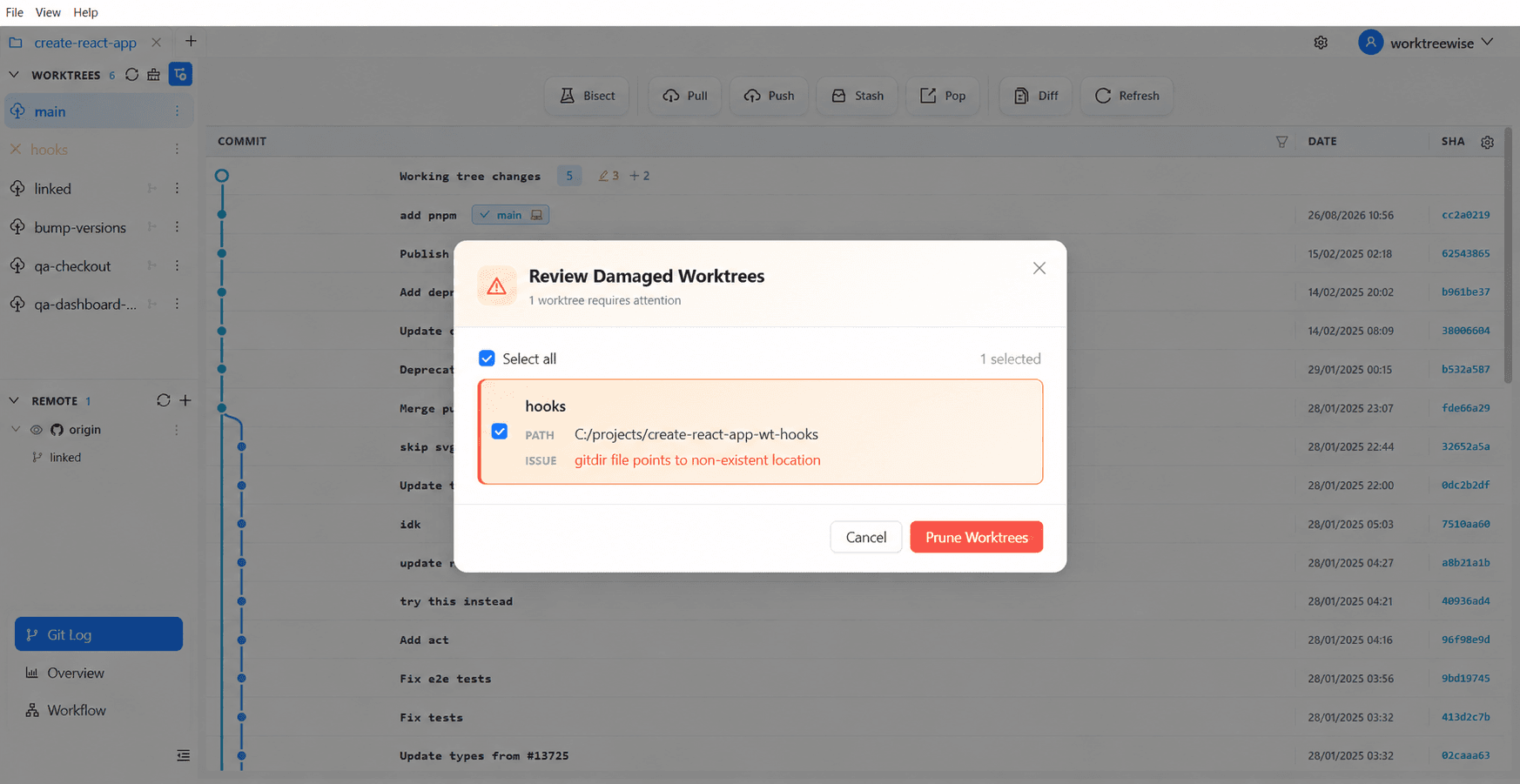
- ★WorktreeWise periodically audits worktree paths and highlights missing directories with an intuitive prune action right in the sidebar.
Key Takeaways
- 01.Deleting a worktree folder manually leaves behind an active Git registration.
- 02.`git worktree prune` synchronizes Git's metadata with reality.
- 03.Lock worktrees on removable drives to prevent accidental pruning.
How WorktreeWise Solves This Visually
WorktreeWise eliminates the manual friction and mental overhead of CLI flags. It displays real-time branch states, uncommitted modifications, active terminals, and lock statuses across all worktrees on a single visual dashboard.
WorktreeWise Engineering Publication
Written and curated by the core WorktreeWise team. We build developer tools that turn Git worktrees, workflows, and parallel AI coding agents into second nature.