

Worktree cannot be removed
TL;DR: The 30-Second Summary
Git refuses to remove a worktree containing untracked files, uncommitted edits, or ignored build artifacts to prevent catastrophic data loss. Inspect with `git status --short`, stash or commit your changes, or pass `-f` / `--force` only when you are 100% certain the files are disposable.
The Real-Life Scenario
“Noah finishes a frontend revamp and triggers `git worktree remove ../feature-ui`. Instead of cleaning up, Git throws: `fatal: '/repos/feature-ui' contains modified or untracked files, use --force to delete it`. Noah isn't sure whether those untracked files are temporary test logs or uncommitted production configs.”
When you tell Git to remove a worktree, it does not simply delete a record in a database—it removes the physical directory from your filesystem. To prevent you from accidentally vaporizing hours of uncommitted work, Git performs an aggressive dirty-check before touching anything.
Why Git Refuses to Delete the Worktree Directory
A worktree is considered 'dirty' if there are staged changes, unstaged modifications, untracked files, or submodules with uncommitted changes. Even a single newly created `.log` or `.env.local` file will trip the safety circuit.
What you see in the terminal:
$ git worktree remove ../feature-ui
fatal: '../feature-ui' contains modified or untracked files, use --force to delete itUnder the Hood: Git Plumbing & Architecture
Before deleting a directory, Git inspects the worktree's private index located at `.git/worktrees/<name>/index` against the working tree state using `lstat()` calls. If any inode timestamp or file hash disagrees, or if entries exist that are untracked by the index, the command aborts before performing any filesystem unlink operations.
Quick Command Recipes
Copy and adapt these commands directly in your terminal:
Check what is preventing removal
Shows all untracked (`??`) and modified (`M`) files inside the worktree directory.
git -C ../feature-ui status --short -uallSafe removal after stash
Stashes all modifications including untracked files into the repository stash before deleting the directory.
git -C ../feature-ui stash -u
git worktree remove ../feature-ui
Forced removal (irreversible)
Bypasses the dirty check and deletes the worktree and all untracked files immediately.
git worktree remove -f ../feature-uiStep-by-Step Practical Walkthrough
Follow these verified steps to safely resolve the issue and guarantee that your filesystem and Git references are in sync.
Inspect untracked and modified files
Never blindly append `-f` until you know what files Git is trying to protect. Run status with untracked mode set to all.
git -C ../feature-ui status --short -uallM src/config.ts ?? .env.local ?? test-output.json
Preserve valuable work if needed
If `.env.local` or `src/config.ts` contains valuable configuration or edits, commit them to the branch or save them to the global stash with untracked files included.
git -C ../feature-ui stash push -u -m 'wip before worktree cleanup'Saved working directory and index state On feature-ui: wip before worktree cleanup
Execute the clean removal
Now that the working directory is clean, run the remove command from your main repository.
git worktree remove ../feature-uiConfirm removal from Git's registry
Run `git worktree list` to confirm that the entry has been purged from `.git/worktrees/`.
git worktree list/repos/main 04e3a1f [main]
Edge Cases & Advanced Scenarios
Locked files on Windows (EPERM / EBUSY)
On Windows, running language servers (VS Code, IntelliJ, ESLint) or active terminal prompts hold file locks on the folder. Close the editor or terminal before running remove.
taskkill /F /IM node.exeIgnored files triggering removal errors
In older Git versions, ignored files (like `node_modules`) occasionally blocked removal. Pass `--force` twice (`-f -f`) or delete `node_modules` first.
git worktree remove -f ../feature-uiCommon Mistakes to Avoid
❌ Mistake: Using `rm -rf` / `rmdir /s /q` instead of `git worktree remove`
Why it causes trouble: The directory disappears, but Git's metadata in `.git/worktrees/` remains behind, creating a 'ghost' locked branch.
What to do instead: Always use `git worktree remove`. If you already deleted the folder, run `git worktree prune`.
❌ Mistake: Forgetting that `-f` permanently deletes untracked files
Why it causes trouble: Local environment files, private API keys, and unpushed scratch scripts are gone forever.
What to do instead: Always inspect with `status -uall` first.
Verification Checklist
- ✓The directory `../feature-ui` no longer exists on disk
- ✓`git worktree list` does not show the retired path
- ✓The branch `feature-ui` still exists in `git branch` (removal only deletes the working directory, not your commits)
Senior Engineering Tips
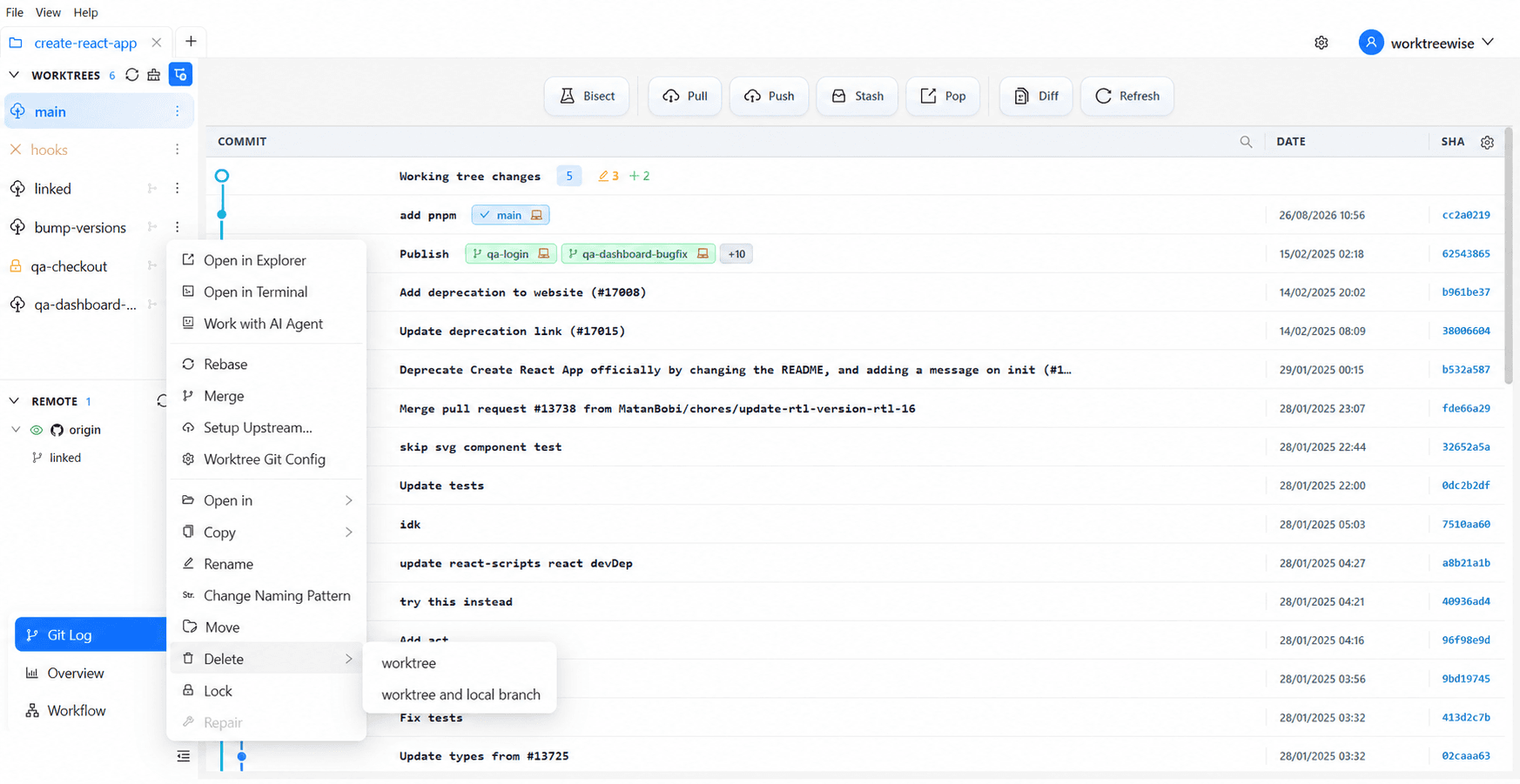
- ★WorktreeWise shows a preview dialog of all uncommitted and untracked files before confirming worktree deletion, preventing accidental data loss.
- ★Worktree removal does NOT delete the Git branch. You can safely recreate the worktree at any time from the same branch.
Key Takeaways
- 01.Git blocks worktree removal to protect uncommitted code and untracked files.
- 02.Use `git -C <path> status -uall` to audit files before choosing between stash or force-delete.
- 03.Never delete worktree folders via OS file managers without following up with `git worktree prune`.
How WorktreeWise Solves This Visually
WorktreeWise eliminates the manual friction and mental overhead of CLI flags. It displays real-time branch states, uncommitted modifications, active terminals, and lock statuses across all worktrees on a single visual dashboard.
WorktreeWise Engineering Publication
Written and curated by the core WorktreeWise team. We build developer tools that turn Git worktrees, workflows, and parallel AI coding agents into second nature.