

Worktree is pruneable
TL;DR: The 30-Second Summary
A worktree is marked 'pruneable' by Git when its filesystem directory cannot be accessed, has been deleted, or its `.git` pointer is missing. Discover how Git decides when an entry is pruneable and how to safely audit before running `git worktree prune`.
The Real-Life Scenario
“During a routine check of `git worktree list -v`, Lina notices three entries tagged with `prunable`. She needs to know whether pruning them will delete any uncommitted code or if it is completely safe.”
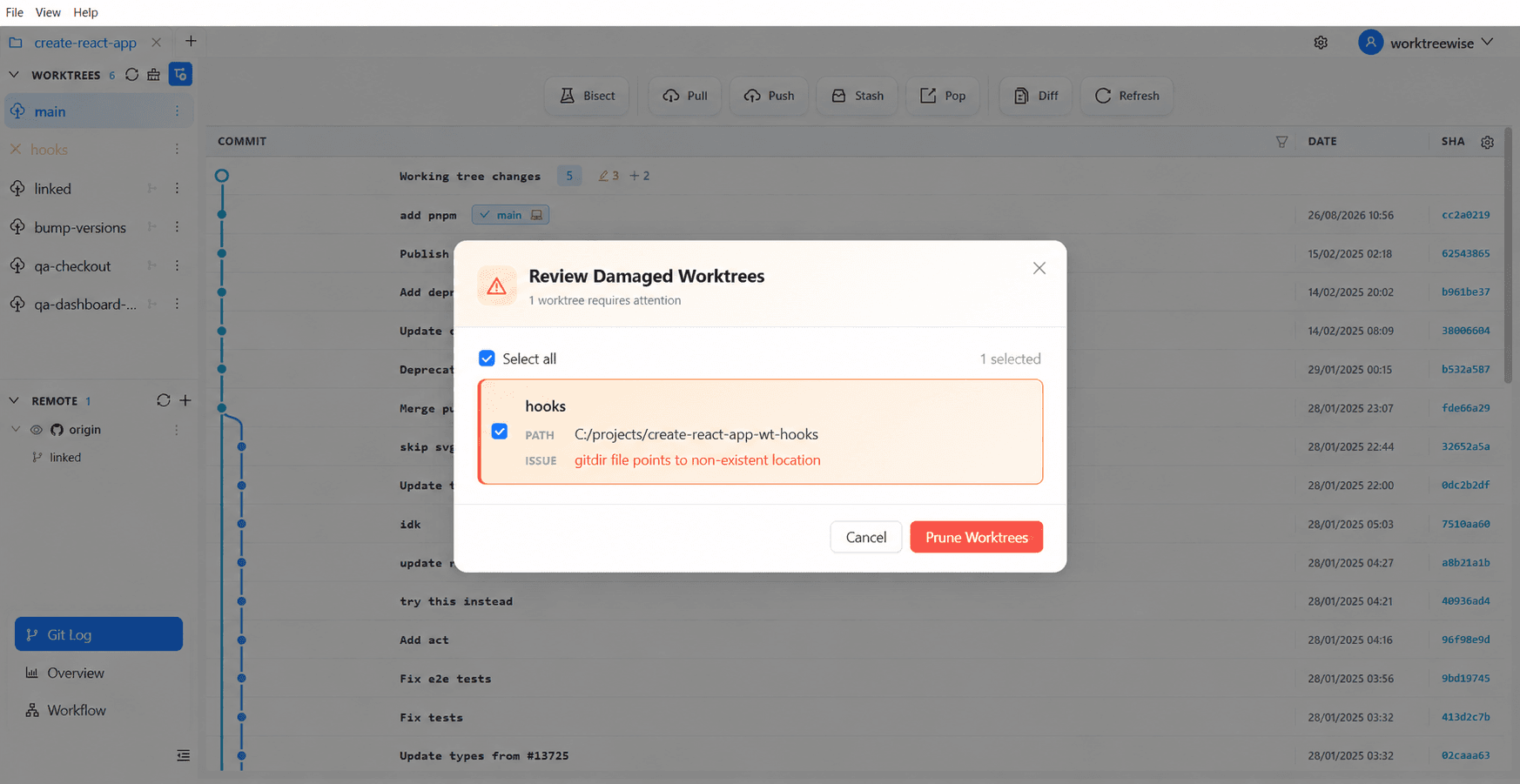
The term 'pruneable' sounds ominous to developers who worry about losing work. In reality, Git only marks a worktree as pruneable when the physical directory has ALREADY disappeared from disk. Pruning merely cleans up the empty administrative shell.
What Makes a Worktree 'Pruneable'?
When Git scans `.git/worktrees/`, it checks whether the path stored in each worktree's `gitdir` file actually exists on your storage drive. If `stat()` returns `ENOENT` (file not found), Git flags the entry as pruneable.
What you see in the terminal:
$ git worktree list -v
/projects/api-main     04e3a1f [main]
/projects/api-feature 18c42bb [feature] prunable (gitdir points to non-existent location)Under the Hood: Git Plumbing & Architecture
Git checks if the entry is locked. If `.git/worktrees/<name>/locked` exists, Git will NEVER prune the worktree, even if the directory is missing. If it is unlocked and missing, it qualifies for pruning once `gc.worktreePruneExpire` has elapsed.
Quick Command Recipes
Copy and adapt these commands directly in your terminal:
Safely audit pruneable entries
Simulates the pruning operation and outputs what will be removed.
git worktree prune --dry-run -vPrune unlocked missing entries
Removes administrative folders for confirmed deleted worktrees.
git worktree prune -vStep-by-Step Practical Walkthrough
Follow these verified steps to safely resolve the issue and guarantee that your filesystem and Git references are in sync.
Check why the worktree is pruneable
Inspect the exact path Git is trying to reach.
git worktree list --porcelainworktree /projects/api-feature HEAD 18c42bb5... branch refs/heads/feature prunable gitdir points to non-existent location
Verify the directory is genuinely not needed
Check if the directory was on a disconnected USB drive or network share. If it was, reconnect the drive. If it was deleted intentionally, proceed to prune.
ls /projects/api-featurels: cannot access '/projects/api-feature': No such file or directory
Run prune to clear the record
Clean up Git's administrative metadata.
git worktree prune -vRemoving worktrees/api-feature
Edge Cases & Advanced Scenarios
Worktree directory exists but permission is denied
If permissions prevent Git from reading the directory, Git may misidentify it as missing. Verify folder permissions before pruning.
Common Mistakes to Avoid
❌ Mistake: Pruning without verifying external drive mounts
Why it causes trouble: Worktrees on an unmounted external SSD lose their registration and must be repaired later.
What to do instead: Lock external worktrees with `git worktree lock`.
Verification Checklist
- ✓Pruning deletes only records inside `.git/worktrees/`, never your Git commits or branches
- ✓`git worktree list` is clean and accurate
Senior Engineering Tips
- ★Pruning is completely harmless if you already deleted the folder on purpose. It simply tells Git to catch up with the filesystem.
Key Takeaways
- 01.Pruneable means: 'Git metadata exists, but the folder on disk is already gone'.
- 02.Pruning does not delete your branches or commit history.
- 03.Use `--dry-run` to preview before pruning.
How WorktreeWise Solves This Visually
WorktreeWise eliminates the manual friction and mental overhead of CLI flags. It displays real-time branch states, uncommitted modifications, active terminals, and lock statuses across all worktrees on a single visual dashboard.
WorktreeWise Engineering Publication
Written and curated by the core WorktreeWise team. We build developer tools that turn Git worktrees, workflows, and parallel AI coding agents into second nature.