

Worktree locked and cannot remove
TL;DR: The 30-Second Summary
A worktree becomes locked when `git worktree lock` is executed or when an administrative lock file is created in `.git/worktrees/<name>/locked`. Locked worktrees cannot be removed or pruned. Inspect the lock reason with `git worktree list --porcelain` and unlock with `git worktree unlock <path>`.
The Real-Life Scenario
“A CI maintenance job attempts to clean up old build worktrees, but Git halts: `fatal: '/builds/preview-42' is locked: mounted on network NFS share`. The worktree was locked to prevent accidental pruning during maintenance.”
Git worktree locking is an intentional safeguard designed for removable storage, network mounts, and long-running background tasks. When locked, Git refuses to remove, move, or prune the worktree until it is explicitly unlocked.
Why Worktrees are Locked
When a worktree is placed on an external SSD or network volume that might be unmounted, `git worktree prune` could mistakenly assume the folder is missing and delete its administrative metadata. Locking prevents this.
What you see in the terminal:
$ git worktree remove /builds/preview-42
fatal: '/builds/preview-42' is locked: mounted on network NFS shareUnder the Hood: Git Plumbing & Architecture
Locking is represented by a simple text file: `.git/worktrees/<name>/locked`. The text inside the file is the reason provided when the lock was created. As long as this file exists, `git worktree remove` and `git worktree prune` treat the worktree as immutable.
Quick Command Recipes
Copy and adapt these commands directly in your terminal:
Inspect lock status and reason
Displays `locked <reason>` for any locked worktrees in the repository.
git worktree list --porcelainUnlock a worktree
Removes the `.git/worktrees/<name>/locked` file, restoring normal operations.
git worktree unlock /path/to/worktreeLock with a custom reason
Protects a worktree from accidental removal or automatic pruning.
git worktree lock --reason 'reviewing production bug' /path/to/worktreeStep-by-Step Practical Walkthrough
Follow these verified steps to safely resolve the issue and guarantee that your filesystem and Git references are in sync.
Check why the worktree is locked
Run porcelain list to inspect the lock reason.
git worktree list --porcelainworktree /builds/preview-42 HEAD 94a11bc... branch refs/heads/preview-42 locked mounted on network NFS share
Unlock the worktree
Run the unlock command to release the administrative lock.
git worktree unlock /builds/preview-42Remove the worktree if needed
Now that it is unlocked, normal removal works without errors.
git worktree remove /builds/preview-42Edge Cases & Advanced Scenarios
Lock file left behind after a machine crash
If `git worktree unlock` fails due to filesystem errors, you can manually delete the `.git/worktrees/<name>/locked` file.
rm .git/worktrees/preview-42/lockedCommon Mistakes to Avoid
❌ Mistake: Passing `--force` to `git worktree remove` expecting it to bypass locks
Why it causes trouble: Even `--force` does NOT override an active worktree lock in Git.
What to do instead: You must run `git worktree unlock` first.
Verification Checklist
- ✓`git worktree list` no longer displays `locked` next to the worktree entry
- ✓Removal and pruning execute without lock warnings
Senior Engineering Tips
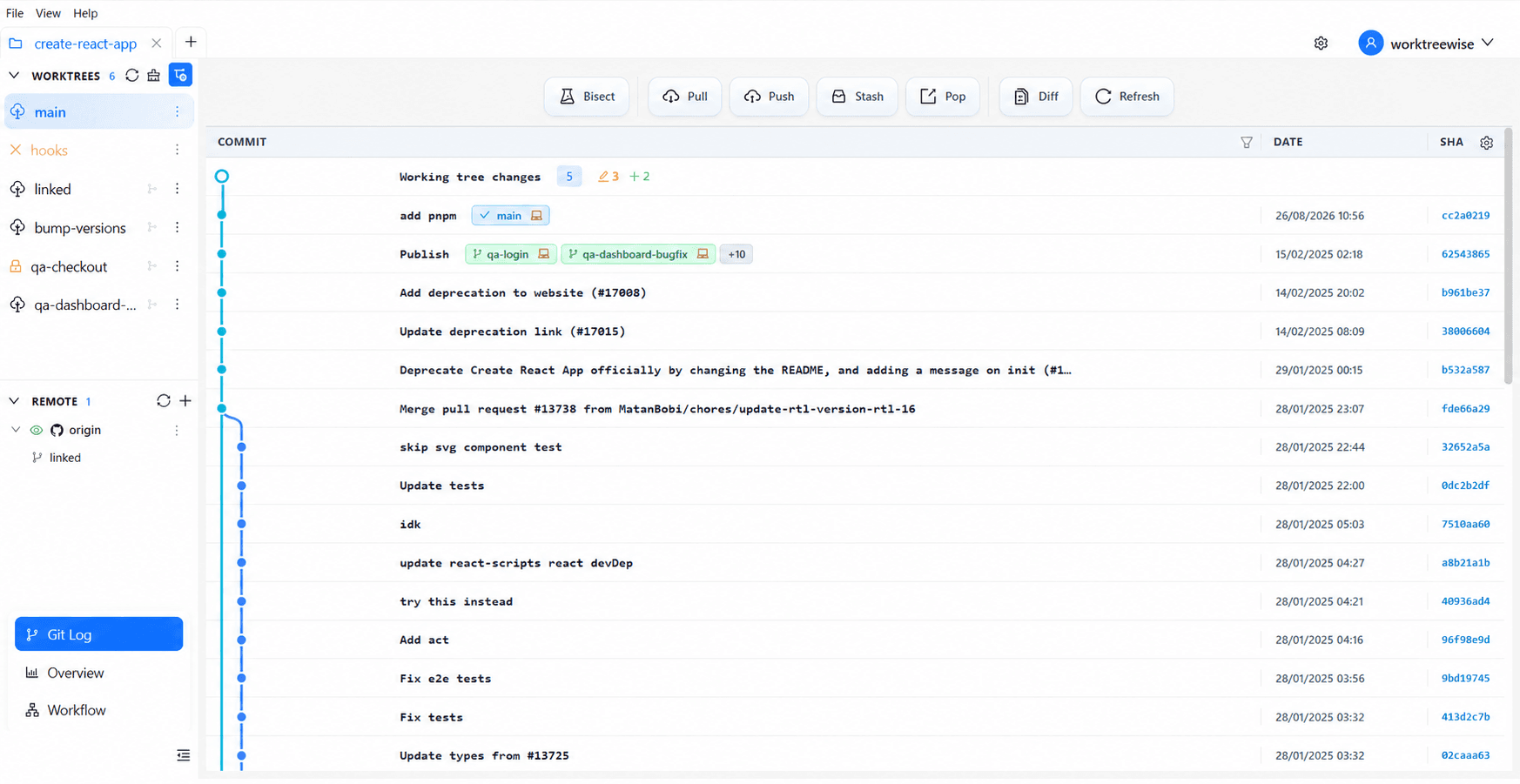
- ★WorktreeWise displays a clear padlock icon next to locked worktrees and allows toggling locks with a single click.
Key Takeaways
- 01.Locking protects worktrees from accidental deletion and pruning.
- 02.`git worktree remove --force` will not delete a locked worktree.
- 03.Unlock using `git worktree unlock <path>`.
How WorktreeWise Solves This Visually
WorktreeWise eliminates the manual friction and mental overhead of CLI flags. It displays real-time branch states, uncommitted modifications, active terminals, and lock statuses across all worktrees on a single visual dashboard.
WorktreeWise Engineering Publication
Written and curated by the core WorktreeWise team. We build developer tools that turn Git worktrees, workflows, and parallel AI coding agents into second nature.