

Detached HEAD in worktree
TL;DR: The 30-Second Summary
When a worktree is created from a tag, commit SHA, or remote branch without `-b`, it enters 'detached HEAD' state. Any commits made here are not bound to a branch and will be lost on cleanup. Fix this by creating a branch pointer immediately with `git switch -c <new-branch>`.
The Real-Life Scenario
“Sam creates a worktree to test release tag `v1.4.0`. While testing, he writes two critical bugfixes and commits them. Only later does he notice the warning: `You are in 'detached HEAD' state. Commits made here do not belong to any branch`.”
Detached HEAD is one of the most common surprises in Git worktrees. When you create a worktree from a tag or commit hash instead of a local branch, Git checks out the exact commit directly. While useful for read-only inspection, committing in this state risks losing your work during garbage collection.
The Danger of Detached HEAD
When `HEAD` is detached, commits are not referenced by any branch pointer in `refs/heads/`. If you delete the worktree or switch commits, the new commits become orphaned and will eventually be permanently deleted by `git prune` and `git gc`.
What you see in the terminal:
$ git -C ../test-wt status
HEAD detached at v1.4.0
nothing to commit, working tree cleanUnder the Hood: Git Plumbing & Architecture
In a normal branch checkout, `.git/worktrees/<name>/HEAD` contains `ref: refs/heads/<branch>`. In a detached worktree, `HEAD` contains a raw 40-character commit SHA directly. Any new commit updates `HEAD` to the new SHA, but no ref in `refs/heads/` is updated.
Quick Command Recipes
Copy and adapt these commands directly in your terminal:
Attach commits to a new branch immediately
Creates a new branch pointing to your current detached commit and attaches HEAD to it.
git switch -c fix/release-bugfixCheck current commit SHA
Prints the exact commit hash so you have a safety record before switching.
git rev-parse HEADStep-by-Step Practical Walkthrough
Follow these verified steps to safely resolve the issue and guarantee that your filesystem and Git references are in sync.
Check your current detached commits
Inspect the commit log in the worktree to verify what commits were created while detached.
git log --oneline -n 3a93b41c (HEAD) fix: correct calculation on billing vat 412e8b0 fix: handle empty response payload e104a99 (tag: v1.4.0) release version 1.4.0
Create and switch to a new branch
Turn the detached state into a proper named branch instantly.
git switch -c fix/release-bugfixSwitched to a new branch 'fix/release-bugfix'
Verify the worktree is now bound to the branch
Run status to confirm HEAD is now tracking your new branch.
git statusOn branch fix/release-bugfix nothing to commit, working tree clean
Edge Cases & Advanced Scenarios
You already switched away and lost the commit SHA
Use `git reflog` inside the worktree or main repo to recover the orphaned commit SHA.
git reflog -n 5
git branch recover-work <sha>Common Mistakes to Avoid
❌ Mistake: Removing the worktree before creating a branch
Why it causes trouble: The commits become unreferenced dangling objects eligible for garbage collection.
What to do instead: Always run `git switch -c <name>` before deleting a detached worktree.
Verification Checklist
- ✓`git status` reports 'On branch <branch_name>'
- ✓`git worktree list` displays `[branch-name]` instead of `(detached HEAD)`
Senior Engineering Tips
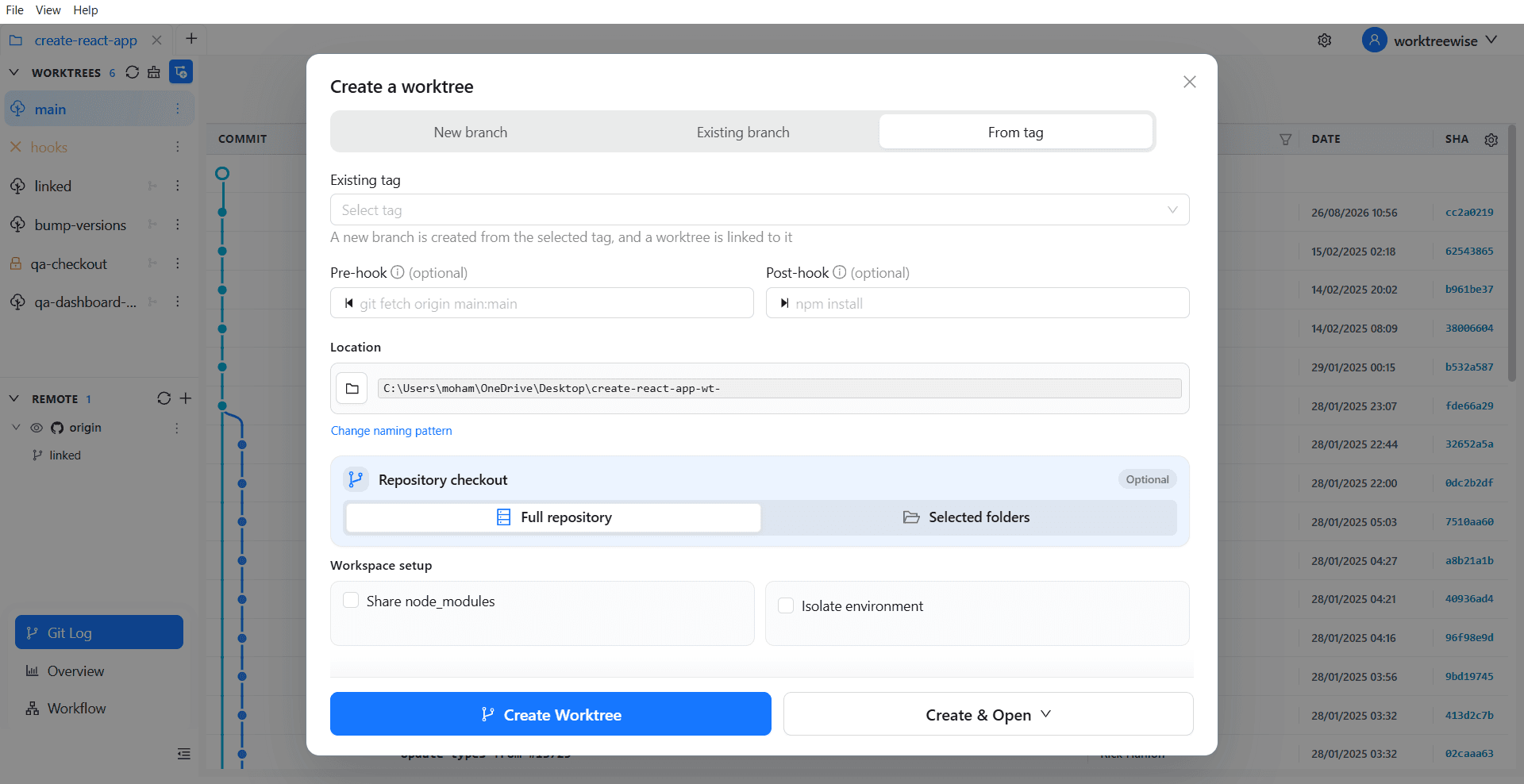
- ★In WorktreeWise, when creating a worktree from a tag or commit, the UI automatically prompts you to create a new branch or explicitly check out as detached.
Key Takeaways
- 01.Detached HEAD means your commits are not anchored by any named branch.
- 02.`git switch -c <new-branch>` saves detached commits in one step.
- 03.Use `git reflog` if you accidentally navigated away before saving.
How WorktreeWise Solves This Visually
WorktreeWise eliminates the manual friction and mental overhead of CLI flags. It displays real-time branch states, uncommitted modifications, active terminals, and lock statuses across all worktrees on a single visual dashboard.
WorktreeWise Engineering Publication
Written and curated by the core WorktreeWise team. We build developer tools that turn Git worktrees, workflows, and parallel AI coding agents into second nature.