

Worktree metadata corrupted
TL;DR: The 30-Second Summary
Corrupted worktree metadata occurs when files inside `.git/worktrees/` are modified, partially restored from conflicting backups, or damaged by disk errors. Inspect individual metadata folders, fix `gitdir` and `commondir` pointers, or run `git worktree repair`.
The Real-Life Scenario
“After an incomplete Dropbox sync or partial backup restore, `.git/worktrees/` contains duplicate directories and corrupted HEAD files. Running any `git worktree` command outputs `fatal: corrupted worktree administrative files`.”
Git stores the administrative state of each linked worktree inside `.git/worktrees/<name>/`. This folder contains lightweight text files that Git reads during every operation. Understanding how these files interact enables you to repair even severe corruption in minutes.
The Structure of `.git/worktrees/<name>/`
Inside each worktree record, Git maintains five critical files: `gitdir` (pointer to the worktree's `.git`), `commondir` (pointer to main `.git`), `HEAD` (active ref), `index` (staged cache), and optional `locked`.
What you see in the terminal:
$ git worktree list
fatal: could not read '/projects/main/.git/worktrees/feat-api/gitdir': No such file or directoryUnder the Hood: Git Plumbing & Architecture
If `gitdir` or `commondir` is missing or corrupted, Git cannot map the worktree to the main object database. Running `git worktree repair` scans all registered paths and recreates missing pointer files.
Quick Command Recipes
Copy and adapt these commands directly in your terminal:
Repair all worktree registrations
Audits and rebuilds corrupted pointer metadata across all worktrees.
git worktree repairInspect metadata folder structure
Lists all registered worktree administrative folders in the main repository.
ls -la .git/worktrees/Step-by-Step Practical Walkthrough
Follow these verified steps to safely resolve the issue and guarantee that your filesystem and Git references are in sync.
Inspect `.git/worktrees/` in your main repository
Check which subfolder is corrupted.
ls -la .git/worktrees/drwxr-xr-x feat-api/ drwxr-xr-x feat-ui/
Check the contents of the corrupted folder
Verify that `commondir` and `gitdir` exist.
cat .git/worktrees/feat-api/commondir../..
Run automated repair
Allow Git to regenerate corrupt pointers.
git worktree repair /projects/feat-apirepair worktree: /projects/feat-api
Remove unrecoverable ghost folders
If an entry in `.git/worktrees/` has no matching folder on disk and repair cannot resolve it, delete that specific subfolder from `.git/worktrees/`.
rm -rf .git/worktrees/broken-ghost-entryEdge Cases & Advanced Scenarios
Dropbox or cloud drive sync conflicts
Cloud sync tools create `gitdir (Conflicted Copy)` files inside `.git`. Delete conflicted duplicate files and exclude `.git/` from sync.
Common Mistakes to Avoid
❌ Mistake: Deleting the entire `.git/worktrees/` folder
Why it causes trouble: Disassociates all active worktrees simultaneously.
What to do instead: Inspect and repair individual subfolders instead of deleting the whole directory.
Verification Checklist
- ✓`git worktree list --porcelain` executes with exit code 0
- ✓All active worktrees appear in the list without fatal errors
Senior Engineering Tips
- ★Never store Git repositories inside cloud-synced folders (Dropbox, Google Drive, OneDrive) without excluding `.git` to prevent file lock contention.
Key Takeaways
- 01.Worktree administrative metadata lives in `.git/worktrees/<name>/`.
- 02.`git worktree repair` automates rebuilding damaged pointers.
- 03.Cloud sync tools are the #1 cause of corrupted metadata.
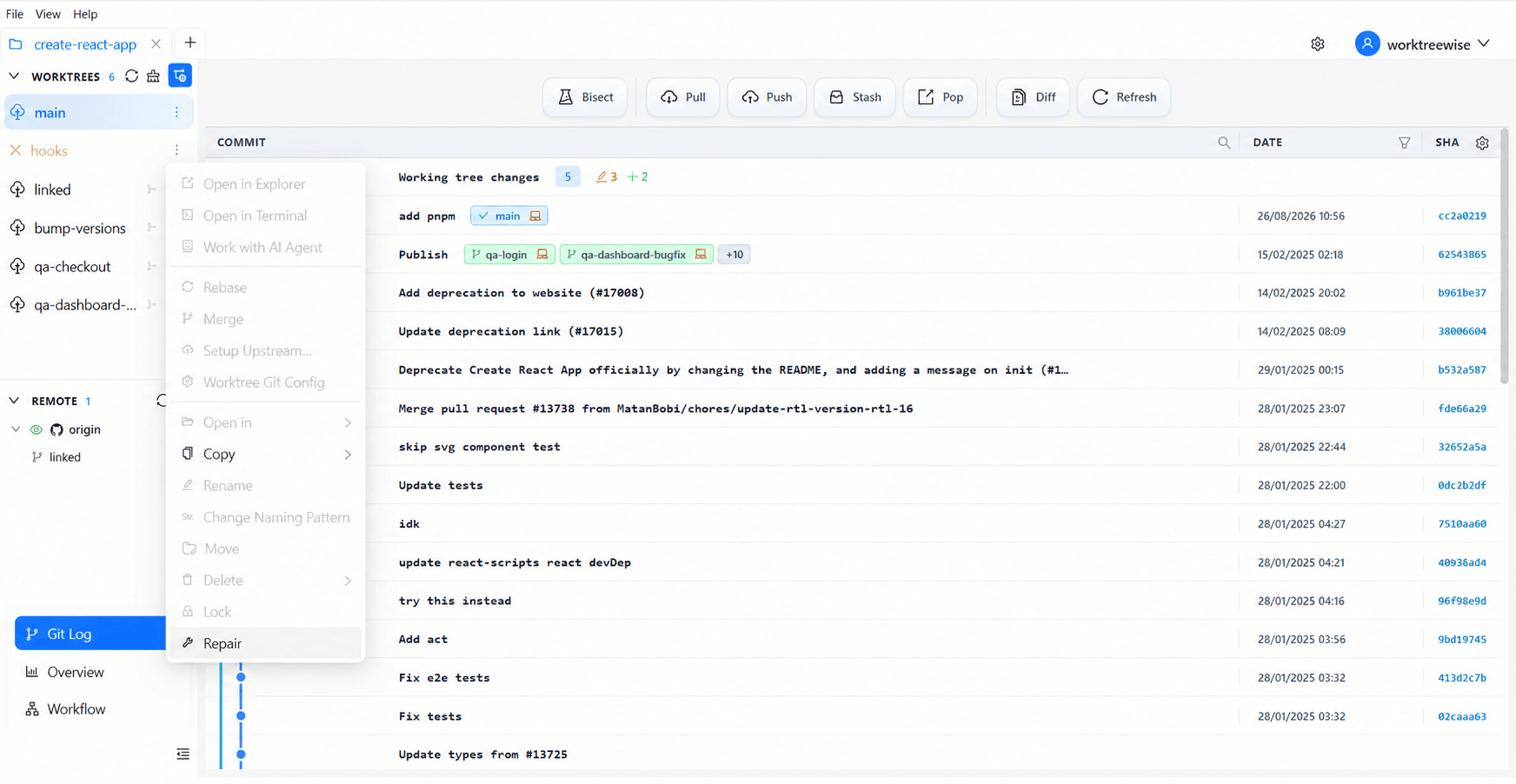
How WorktreeWise Solves This Visually
WorktreeWise eliminates the manual friction and mental overhead of CLI flags. It displays real-time branch states, uncommitted modifications, active terminals, and lock statuses across all worktrees on a single visual dashboard.
WorktreeWise Engineering Publication
Written and curated by the core WorktreeWise team. We build developer tools that turn Git worktrees, workflows, and parallel AI coding agents into second nature.