

Repair a broken worktree
TL;DR: The 30-Second Summary
A broken worktree occurs when index files are corrupted, gitdir pointers are severed, or commits were interrupted during a crash. Diagnose with `git fsck`, repair pointers with `git worktree repair`, and reset the worktree index safely.
The Real-Life Scenario
“A workstation crashes during a forced system reboot while a build was running in a secondary worktree. Upon rebooting, opening the worktree yields `error: bad signature 0x00000000` and `fatal: index file corrupt`.”
Corrupted worktrees can appear terrifying because terminal commands stop responding. However, because worktrees share the underlying object database with the main repository, your commit history and blobs are almost always safe.
Anatomy of Worktree Corruption
Worktrees maintain their own private `index`, `HEAD`, and `ORIG_HEAD` files in `.git/worktrees/<name>/`. If power loss occurs while Git is writing to the index, the index file is truncated with null bytes.
What you see in the terminal:
$ git status
fatal: index file corrupt

$ git worktree list
fatal: could not read worktree /projects/feature: Not a directoryUnder the Hood: Git Plumbing & Architecture
The worktree's index file stores staged file state and inode cache metadata. Since the index is just a staging cache, deleting a corrupted index file and checking it out again from `HEAD` restores 100% of tracked repository state without data loss.
Quick Command Recipes
Copy and adapt these commands directly in your terminal:
Repair worktree pointers
Fixes severed bidirectional links between all worktrees and the main repository.
git worktree repairRebuild a corrupted worktree index
Deletes the corrupt index file and rebuilds it cleanly from the worktree's HEAD commit.
rm .git/worktrees/<name>/index
git -C /path/to/worktree reset
Verify repository integrity
Performs full consistency check on all Git objects and refs.
git fsck --no-danglingStep-by-Step Practical Walkthrough
Follow these verified steps to safely resolve the issue and guarantee that your filesystem and Git references are in sync.
Identify which part is broken
Determine whether the issue is a pointer failure or a corrupted index file.
git -C /projects/broken-wt rev-parse --git-dir/projects/main/.git/worktrees/broken-wt
Repair pointers first
Run `git worktree repair` from the main repository.
git worktree repair /projects/broken-wtrepair worktree: /projects/broken-wt
Recover from index corruption if needed
If Git reports index file corrupt, delete the worktree's private index file and reset.
rm /projects/main/.git/worktrees/broken-wt/indexRebuild index from current HEAD
Run `git reset` inside the worktree directory to regenerate a clean index.
git -C /projects/broken-wt resetUnstaged changes after reset: M src/index.ts
Verify repository health
Run `git status` inside the repaired worktree.
git -C /projects/broken-wt statusOn branch feature-work nothing to commit, working tree clean
Edge Cases & Advanced Scenarios
Worktree is locked and preventing operations
If a lock file `.git/worktrees/<name>/locked` was left behind after a crash, unlock it with `git worktree unlock`.
git worktree unlock /projects/broken-wtCommon Mistakes to Avoid
❌ Mistake: Deleting the main `.git` folder in panic
Why it causes trouble: Destroys all branches, tags, and commits for the entire project.
What to do instead: Only modify files inside `.git/worktrees/<name>/` for that specific worktree.
Verification Checklist
- ✓`git fsck --no-dangling` reports clean repository state
- ✓`git -C <path> status` returns zero errors
Senior Engineering Tips
- ★Because worktrees share the main object database, you can always recreate a broken worktree from scratch in seconds without losing commits.
Key Takeaways
- 01.The worktree index is a rebuildable cache: deleting a corrupted index does not lose committed code.
- 02.`git worktree repair` fixes severed pointers.
- 03.The shared object database keeps your history safe even when individual worktrees crash.
How WorktreeWise Solves This Visually
WorktreeWise eliminates the manual friction and mental overhead of CLI flags. It displays real-time branch states, uncommitted modifications, active terminals, and lock statuses across all worktrees on a single visual dashboard.
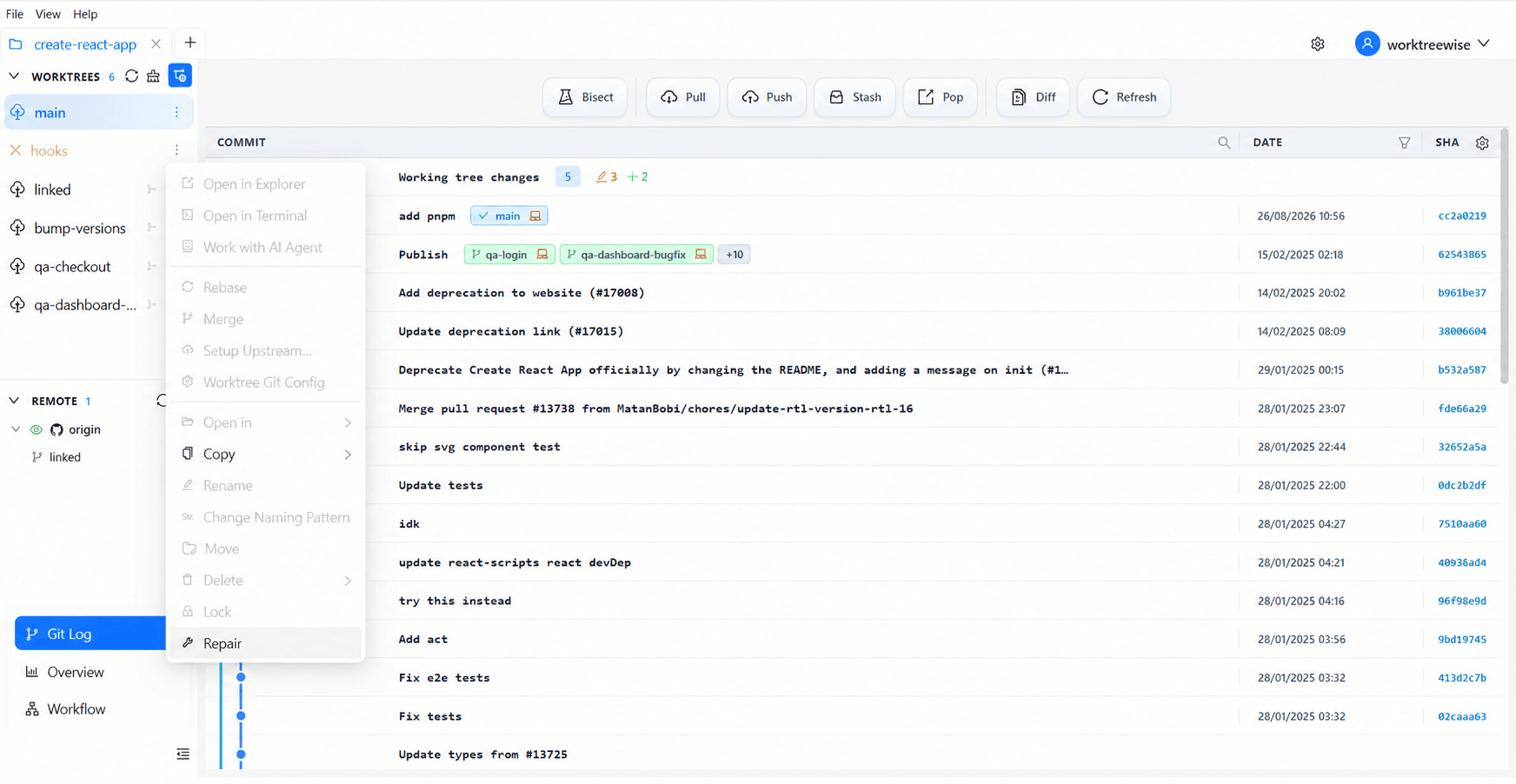
WorktreeWise Engineering Publication
Written and curated by the core WorktreeWise team. We build developer tools that turn Git worktrees, workflows, and parallel AI coding agents into second nature.