

Worktree GUI vs CLI
TL;DR: The 30-Second Summary
While raw Git CLI commands (`git worktree add`, `list`, `remove`, `prune`) are scriptable, remembering obscure flags (`--porcelain`, `--lock-reason`, `repair`) and tracking multiple folders manually is mentally exhausting. WorktreeWise combines visual discoverability with underlying Git safety.
The Real-Life Scenario
“A developer spends 10 minutes debugging a broken worktree path using terminal commands. A teammate using WorktreeWise clicks 'Repair' and fixes the issue in 2 seconds with automatic status validation.”
The command line is the heart of Git. But as development setups grow to include multiple parallel worktrees, AI coding agents, and complex environment configs, juggling terminal tabs becomes a major cognitive burden. A purpose-built GUI like WorktreeWise bridges the gap between raw CLI power and visual clarity.
The Cognitive Load of Multi-Worktree CLI Management
Managing 5 worktrees in CLI requires tracking directory paths, remembering branch mappings, checking uncommitted status across all folders, and running prune commands manually.
What you see in the terminal:
$ git worktree list --porcelain
worktree /Users/dev/repos/main
HEAD 04e3a1f...
branch refs/heads/main

worktree /Users/dev/repos/feat-ui
HEAD 18c42bb...
branch refs/heads/feat-ui
# Which of these folders has uncommitted changes? You have to cd into each one!Under the Hood: Git Plumbing & Architecture
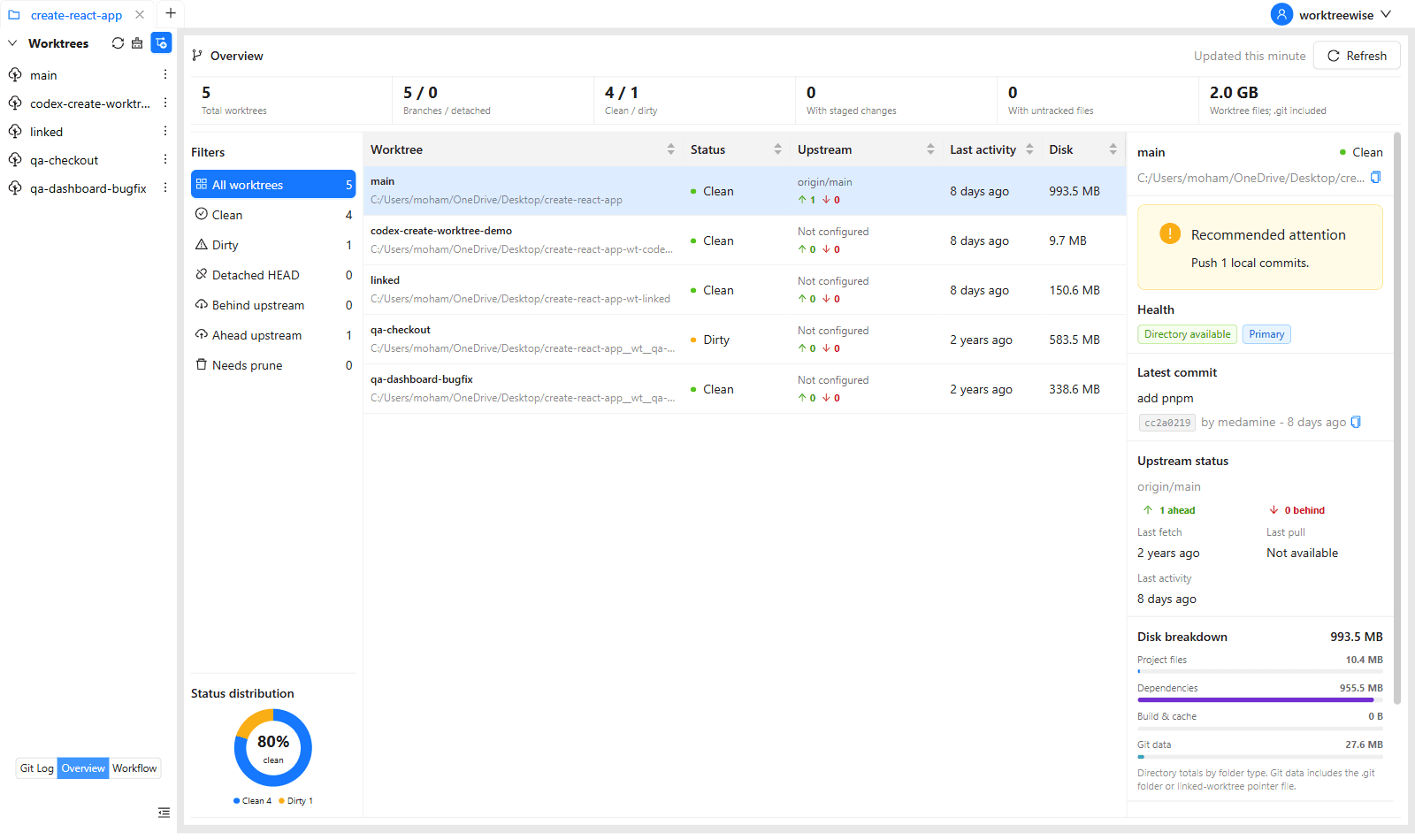
WorktreeWise monitors filesystem changes and Git reflogs in the background, updating live statuses (dirty, clean, locked, prunable) in a unified visual dashboard.
Quick Command Recipes
Copy and adapt these commands directly in your terminal:
Complex CLI audit
Bash script required to see status across all worktrees in CLI.
git worktree list --porcelain && for d in $(git worktree list --porcelain | grep 'worktree ' | cut -d' ' -f2); do git -C $d status --short; doneThe WorktreeWise way
Zero commands needed to see cross-worktree status.
# Simply look at the WorktreeWise dashboard: all statuses update in real time!Step-by-Step Practical Walkthrough
Follow these verified steps to safely resolve the issue and guarantee that your filesystem and Git references are in sync.
Visual overview
See all active worktrees, branches, uncommitted files, and active terminals on one screen.
One-click creation
Create worktrees from HEAD, branches, tags, or commits with automatic folder naming.
Automated workflows
Run npm install, copy .env files, and launch editors automatically.
Visual diff and review
Review side-by-side diffs before merging or removing worktrees.
Comparative Feature Matrix
| Capability | WorktreeWise GUI | Raw Git CLI |
|---|---|---|
| Worktree Status at a Glance | Real-time visual badges (dirty, clean, locked) | Must run `git status` in each folder manually |
| Creation Speed | 1-click with preset hooks & templates | Type long commands with flags |
| Editor & Terminal Launching | Integrated multi-terminals & 1-click IDE open | Manual `cd` and `code <path>` |
| AI Agent Orchestration | Manage Claude, Codex, Gemini side-by-side | Manage multiple detached terminal tabs |
| Safe Deletion & Pruning | Visual uncommitted file preview dialog | Easy to accidentally lose untracked files |
Edge Cases & Advanced Scenarios
CI/CD and headless automation
For headless servers and CI/CD pipelines, raw Git CLI scripts remain the best choice.
Common Mistakes to Avoid
❌ Mistake: Relying on memory to track which branch is checked out in which folder
Why it causes trouble: Editing files in the wrong worktree by accident.
What to do instead: Use WorktreeWise's clear visual workspace layout.
Verification Checklist
- ✓All active worktrees and branches are visible in real time
- ✓Terminal and IDE instances open with a single click
Senior Engineering Tips
- ★WorktreeWise uses native Git under the hood, so any actions you take in the GUI are 100% compatible with terminal Git commands.
Key Takeaways
- 01.WorktreeWise eliminates the cognitive load of juggling multiple worktree paths.
- 02.Combines 1-click convenience with under-the-hood Git safety.
- 03.100% compatible with your existing CLI workflows.
How WorktreeWise Solves This Visually
WorktreeWise eliminates the manual friction and mental overhead of CLI flags. It displays real-time branch states, uncommitted modifications, active terminals, and lock statuses across all worktrees on a single visual dashboard.
WorktreeWise Engineering Publication
Written and curated by the core WorktreeWise team. We build developer tools that turn Git worktrees, workflows, and parallel AI coding agents into second nature.