

Separate .env per worktree
TL;DR: The 30-Second Summary
Because `.env` files are untracked by Git, creating a new worktree leaves the new directory without environment variables. Automate copying `.env.example` via pre/post-worktree hooks or WorktreeWise workflows, and keep branch-specific variables isolated.
The Real-Life Scenario
“Elena creates a worktree to test Stripe webhooks on `feature/stripe`. When booting the app, the server immediately crashes with `Missing required environment variable: STRIPE_SECRET_KEY`. She realizes `.env.local` wasn't copied from the main repository.”
Managing environment variables is one of the first hurdles developers encounter when adopting Git worktrees. Because `.env` files contain sensitive secrets and are ignored by `.gitignore`, Git does not track or copy them into newly spawned worktree directories.
Why .env Files Disappear in New Worktrees
Git only checks out tracked files. Any file listed in `.gitignore`—including `.env`, `.env.local`, and `.env.development`—is strictly ignored. When you create a worktree, the directory starts with only tracked files.
What you see in the terminal:
$ git worktree add ../feature-stripe feature/stripe
$ cd ../feature-stripe && npm run dev
Error: Cannot find module or config in .env.local: ENOENTUnder the Hood: Git Plumbing & Architecture
A worktree is a clean checkout based on the target branch's commit tree. Ignored files exist only on disk in the originating directory. You need an automated mechanism to provision worktree-specific environment files upon creation.
Quick Command Recipes
Copy and adapt these commands directly in your terminal:
Manual copy from main repository
Quickly seeds the new worktree with existing development variables.
cp /path/to/main/.env.local ../feature-stripe/.env.localAutomated post-worktree hook (bash)
Automatically generates `.env.local` whenever a worktree is created.
#!/bin/sh
# .git/hooks/post-checkout or WorktreeWise hook
TARGET_DIR="$1"
cp .env.example "$TARGET_DIR/.env.local"Step-by-Step Practical Walkthrough
Follow these verified steps to safely resolve the issue and guarantee that your filesystem and Git references are in sync.
Maintain a pristine .env.example
Keep `.env.example` tracked in Git with placeholder values and clear documentation for every required variable.
Create the worktree
Spawn your new working directory.
git worktree add ../feat-billing -b feat/billing mainCopy and customize environment variables
Seed the worktree and edit any branch-specific variables (e.g. mock API keys or custom ports).
cp .env.example ../feat-billing/.env.localVerify .env is properly ignored
Confirm `.env.local` appears under 'Ignored files' and will never be committed to Git.
git -C ../feat-billing status --ignoredEdge Cases & Advanced Scenarios
Symlinking .env between worktrees
If you want all worktrees to share the exact same `.env` file dynamically, create a filesystem symlink (`ln -s` on macOS/Linux or `mklink` on Windows). Note that edits in one worktree will affect all others.
Common Mistakes to Avoid
❌ Mistake: Force-committing `.env` into Git so worktrees inherit it
Why it causes trouble: Leads to catastrophic security credential leaks to GitHub or GitLab.
What to do instead: Never commit secrets. Automate copying `.env.example` instead.
Verification Checklist
- ✓New worktrees boot successfully with required environment variables
- ✓Secrets remain strictly untracked in `.gitignore`
Senior Engineering Tips
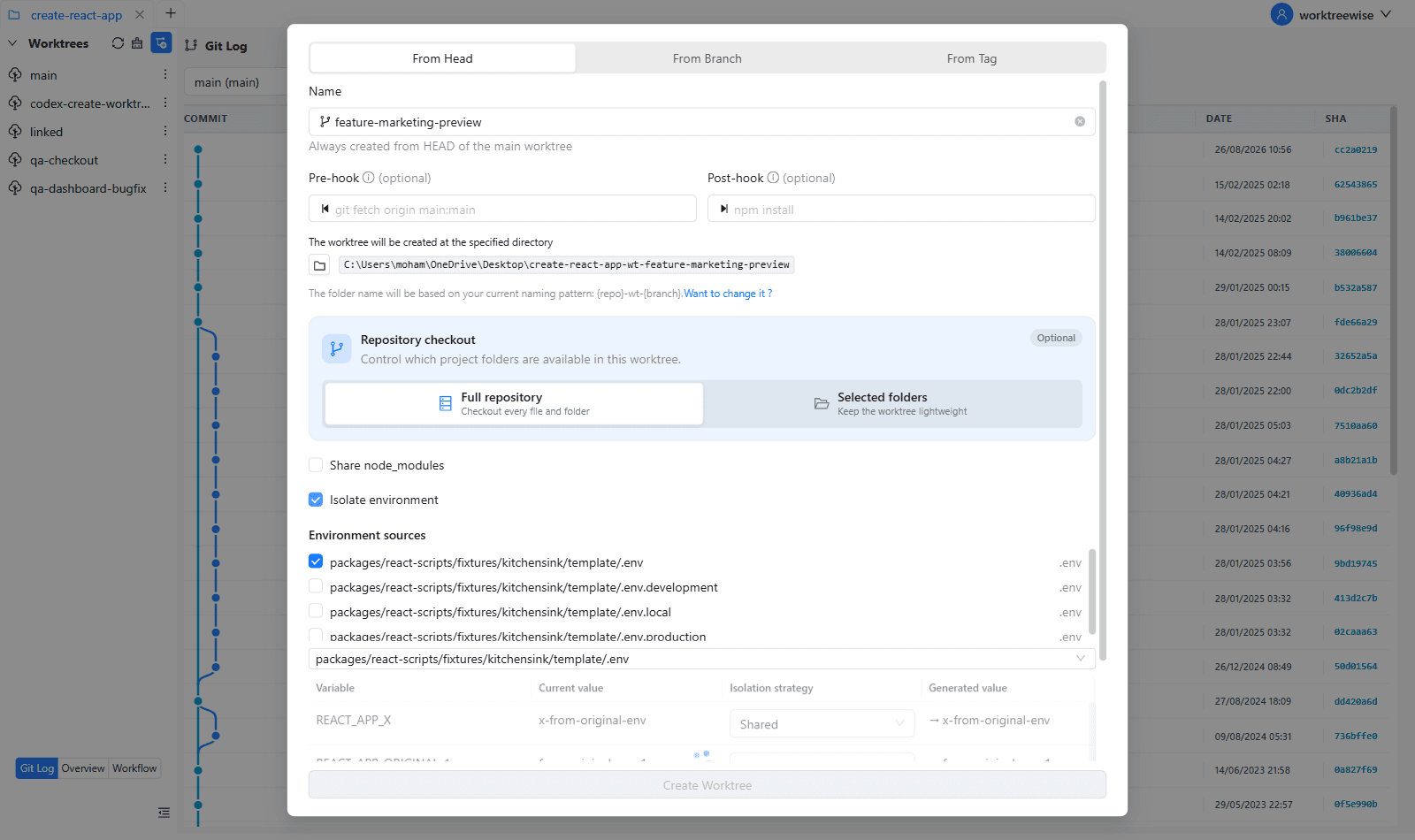
- ★In WorktreeWise, enable the 'Environment Isolation' workflow on worktree creation to automatically copy, template, or offset `.env` files instantly.
Key Takeaways
- 01.Git never copies untracked `.env` files into new worktrees.
- 02.Use `.env.example` as the canonical template.
- 03.Automate `.env` provisioning with WorktreeWise hooks.
How WorktreeWise Solves This Visually
WorktreeWise eliminates the manual friction and mental overhead of CLI flags. It displays real-time branch states, uncommitted modifications, active terminals, and lock statuses across all worktrees on a single visual dashboard.
WorktreeWise Engineering Publication
Written and curated by the core WorktreeWise team. We build developer tools that turn Git worktrees, workflows, and parallel AI coding agents into second nature.