

Database per worktree
TL;DR: The 30-Second Summary
Running concurrent branches against a single shared database corrupts test data and causes migration rollbacks to destroy data. Adopt one of three proven patterns: database-per-worktree, schema-per-worktree, or SQLite-per-worktree.
The Real-Life Scenario
“Branch A introduces a migration adding a `NOT NULL` column `tenant_id`. Branch B is still on the old schema. When the developer switches worktrees, Branch B's API queries immediately crash because the database schema was migrated forward.”
Code state and database state must move together. When you use Git worktrees to run multiple branches in parallel, pointing all worktrees to the same development database leads to migration conflicts, dirty test fixtures, and mysterious bugs.
The Schema Drift Collision
When Branch A runs `prisma migrate dev` or `rails db:migrate`, the database schema changes globally. Branch B, expecting the old schema, crashes on every query.
What you see in the terminal:
error: column "tenant_id" of relation "users" does not exist
LINE 1: SELECT id, email, tenant_id FROM users;Under the Hood: Git Plumbing & Architecture
Databases do not have Git branches. To allow concurrent development, you must either create distinct databases (e.g. `myapp_main` and `myapp_feat_auth`) or use isolated schemas inside the same database engine.
Quick Command Recipes
Copy and adapt these commands directly in your terminal:
Dynamic database URL per worktree
Points the worktree's backend to its own isolated database.
DATABASE_URL=postgresql://localhost/app_feat_auth npm testFast template cloning (PostgreSQL)
Instantly clones schema and seed data from a template database in under 1 second.
createdb -T app_template app_feat_authStep-by-Step Practical Walkthrough
Follow these verified steps to safely resolve the issue and guarantee that your filesystem and Git references are in sync.
Choose an isolation strategy
For small apps, use SQLite files (`dev_worktree.sqlite3`). For PostgreSQL/MySQL, use database-per-worktree.
Create the isolated database
Provision a clean database.
createdb app_feature_searchSet DATABASE_URL in the worktree's .env
Configure `DATABASE_URL=postgres://localhost:5432/app_feature_search`.
Run migrations and seed
Populate the isolated database.
npm run migrate && npm run seedEdge Cases & Advanced Scenarios
Cleaning up temporary databases
Add a post-removal hook in WorktreeWise to drop `app_${worktree_name}` when removing a worktree.
Common Mistakes to Avoid
❌ Mistake: Sharing a single development database across migration branches
Why it causes trouble: Frequent schema rollbacks that corrupt test data and waste hours.
What to do instead: Provision one database per active worktree.
Verification Checklist
- ✓Running migrations in Worktree A does not affect Worktree B
- ✓Test suites run concurrently without database deadlocks
Senior Engineering Tips
- ★PostgreSQL's `createdb -T <template>` feature clones an entire database with seeded tables in milliseconds via copy-on-write storage.
Key Takeaways
- 01.Databases lack native Git branching—isolate them by name or schema.
- 02.Use PostgreSQL templates or SQLite files for instantaneous seeding.
- 03.Drop temporary databases when retiring worktrees.
How WorktreeWise Solves This Visually
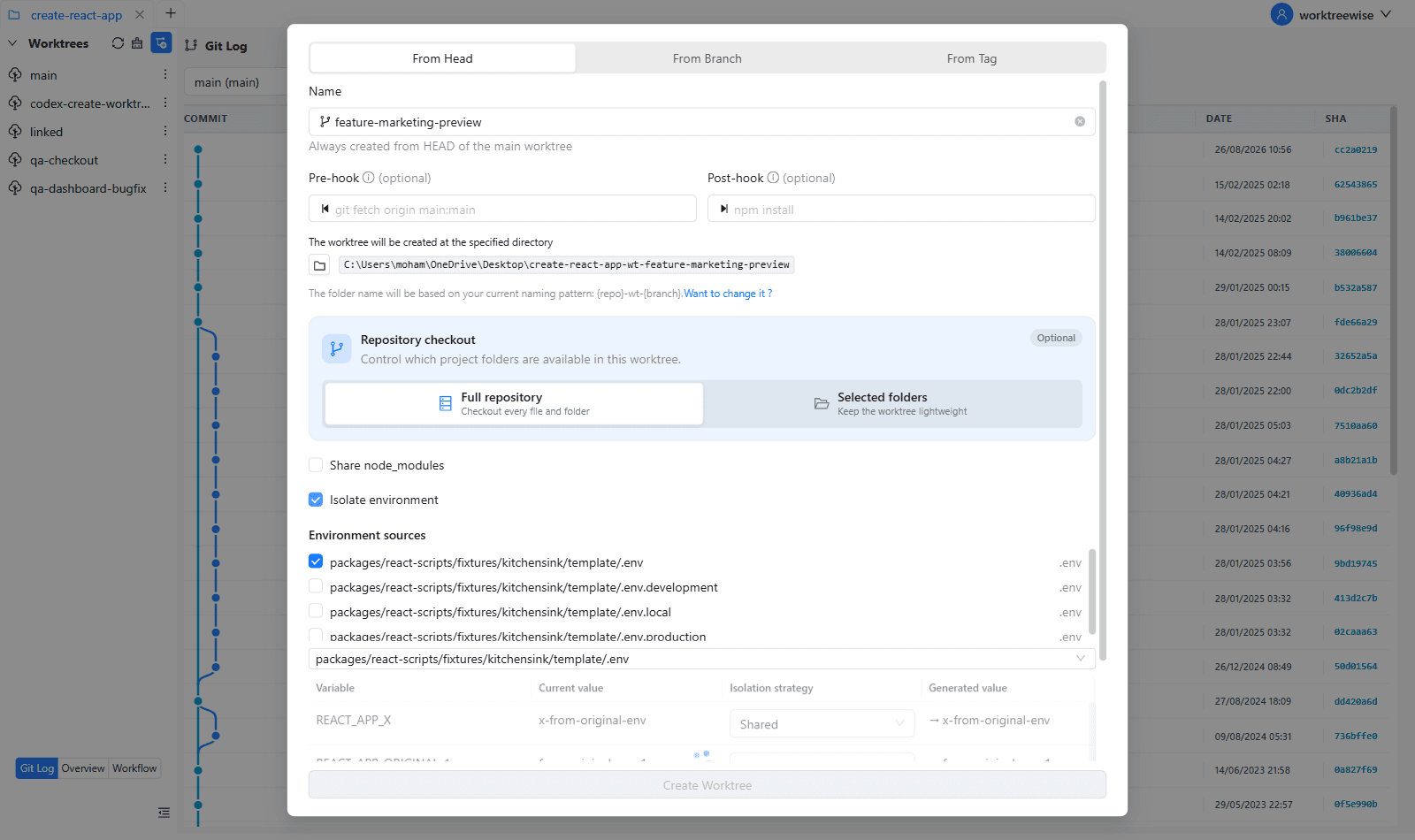
WorktreeWise eliminates the manual friction and mental overhead of CLI flags. It displays real-time branch states, uncommitted modifications, active terminals, and lock statuses across all worktrees on a single visual dashboard.
WorktreeWise Engineering Publication
Written and curated by the core WorktreeWise team. We build developer tools that turn Git worktrees, workflows, and parallel AI coding agents into second nature.