

Multiple agents on one repository
TL;DR: The 30-Second Summary
Scale up development velocity by assigning three or more AI agents to different features simultaneously on the same repository. By using Git worktrees, each agent receives its own directory, branch, and runtime port without index lock collisions or merge conflicts.
The Real-Life Scenario
“A tech lead delegates three parallel tasks: Claude Code handles an API endpoint upgrade, Cursor Agent optimizes CSS rendering, and Gemini CLI writes end-to-end Cypress tests. All three agents run simultaneously in three separate worktrees on the same local repository.”
The modern software engineering team is no longer just humans and one AI assistant—it is an ensemble of specialized AI agents working concurrently. However, orchestrating multiple autonomous agents on a single Git repository requires a robust architectural pattern to prevent agent collisions.
Why Multiple Agents Collide in a Traditional Setup
If two agents attempt to run in the same checkout, Git locks prevent concurrent staging, file edits overwrite each other, and test runners fight over identical port allocations.
What you see in the terminal:
[Agent 1] git commit -m "feat: api v2"
[Agent 2] fatal: Unable to create '/repo/.git/index.lock': File exists.
[Agent 2] Port 3000 is already in use by PID 49102.Under the Hood: Git Plumbing & Architecture
Git worktrees provide the ideal architecture: each agent has a unique directory (`../agent-api`, `../agent-ui`, `../agent-tests`), a dedicated branch (`agent/api`, `agent/ui`, `agent/tests`), and an independent `.git/worktrees/<name>/index` file. They all share the same local object database, meaning zero duplicate disk overhead.
Quick Command Recipes
Copy and adapt these commands directly in your terminal:
Create worktrees for 3 parallel agents
Creates 3 independent directories and branches from the latest main commit.
git worktree add ../agent-api -b agent/api-v2 main
git worktree add ../agent-ui -b agent/ui-redesign main
git worktree add ../agent-tests -b agent/e2e-tests main
Check status of all agent branches
Provides instant visibility into all active agent working directories.
git worktree list
git branch --list 'agent/*'Step-by-Step Practical Walkthrough
Follow these verified steps to safely resolve the issue and guarantee that your filesystem and Git references are in sync.
Define distinct agent domains
Ensure each agent is assigned a well-scoped task that touches different modules (e.g. backend, frontend, testing) to minimize semantic merge conflicts.
Spawn dedicated worktrees for each agent
Create the workspaces in parallel.
git worktree add ../agent-1 -b agent/task-1 main && git worktree add ../agent-2 -b agent/task-2 mainConfigure independent runtime ports
Set `PORT=3001` for Agent 1 and `PORT=3002` for Agent 2 in their respective `.env` files.
Launch agents and monitor progress
Run each agent session in its dedicated folder.
Sequential review and integration
Review and merge each agent branch one by one using standard pull requests or Git merges.
Edge Cases & Advanced Scenarios
Shared database contention
If both agents run database migrations, assign different database names or use SQLite files per worktree.
Common Mistakes to Avoid
❌ Mistake: Assigning two agents to edit the exact same function concurrently
Why it causes trouble: Guaranteed complex merge conflicts during integration.
What to do instead: Decompose tasks along architectural boundaries.
Verification Checklist
- ✓Every running agent has its own directory and distinct port
- ✓All agent branches share a common naming convention (`agent/*`)
Senior Engineering Tips
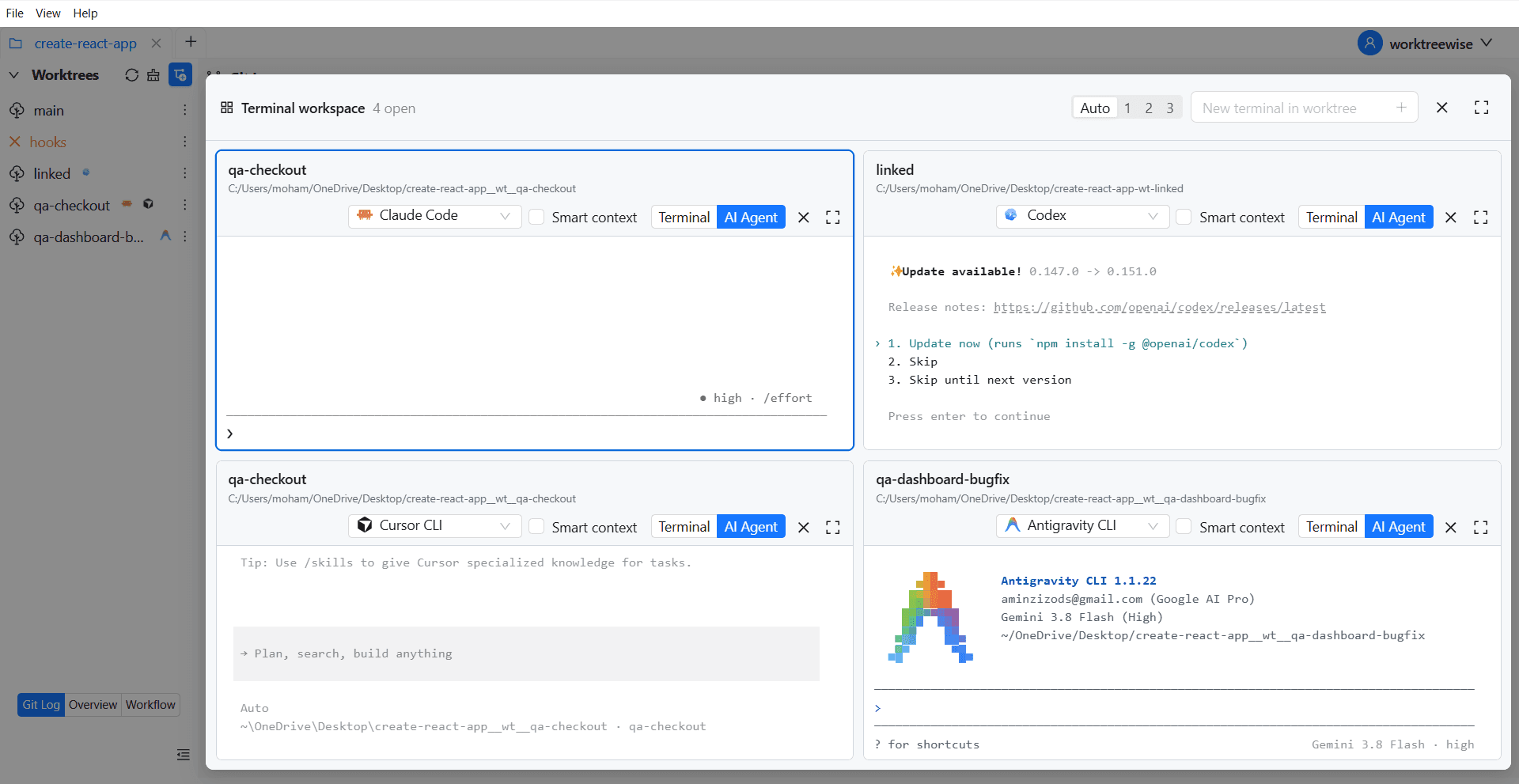
- ★WorktreeWise's Multi-Terminal and AI Agent management views allow monitoring 4+ running agents on a single screen.
Key Takeaways
- 01.Git worktrees make multi-agent local development practical and collision-free.
- 02.Isolate ports, databases, and branches for each agent.
- 03.Integrate agent branches sequentially.
How WorktreeWise Solves This Visually
WorktreeWise eliminates the manual friction and mental overhead of CLI flags. It displays real-time branch states, uncommitted modifications, active terminals, and lock statuses across all worktrees on a single visual dashboard.
WorktreeWise Engineering Publication
Written and curated by the core WorktreeWise team. We build developer tools that turn Git worktrees, workflows, and parallel AI coding agents into second nature.