

Codex + worktrees
TL;DR: The 30-Second Summary
Run OpenAI Codex automated tasks inside sandboxed Git worktrees to prevent destructive script execution, unreviewed file writes, and dirty tree contamination. Isolate the environment, let Codex run unattended, and review commits safely before merging.
The Real-Life Scenario
“Priya needs to generate OpenAPI TypeScript schemas for 40 backend endpoints. Running Codex scripts directly in her working directory would overwrite dozens of files while she reviews a production hotfix. She delegates the schema generation to a Codex worktree.”
OpenAI Codex scripts and CLI agents excel at high-volume code synthesis, repetitive migrations, and automated documentation generation. Because these tasks frequently touch hundreds of files, isolating Codex inside a dedicated Git worktree is essential for developer sanity.
The Danger of Unattended AI Code Generation
When Codex generates code across a large codebase, an errant prompt or hallucinatory script can overwrite existing source files, delete configs, or leave half-migrated syntax that breaks your local build.
What you see in the terminal:
$ codex run generate-schemas
Wrote 48 files...
Error: TypeScript compile failed: 12 errors in src/api/generated/
Your working tree has 52 modified files.Under the Hood: Git Plumbing & Architecture
In a dedicated worktree, even a completely disastrous AI script is harmless. Because the worktree is completely isolated on a separate branch, discarding bad AI output takes a single command (`git worktree remove -f`), leaving your real work pristine.
Quick Command Recipes
Copy and adapt these commands directly in your terminal:
Create Codex scratchpad worktree
Creates an isolated sandbox environment for automated Codex scripts.
git worktree add ../task-codex-schemas -b agent/codex-schemas mainRun Codex in headless mode
Executes generation scripts strictly within the secondary worktree.
cd ../task-codex-schemas && npx codex-cli generateDiscard failed generation instantly
Permanently wipes the failed AI attempt in 2 seconds without risking your repository history.
git worktree remove -f ../task-codex-schemas
git branch -D agent/codex-schemasStep-by-Step Practical Walkthrough
Follow these verified steps to safely resolve the issue and guarantee that your filesystem and Git references are in sync.
Initialize the agent worktree
Branch off a stable commit so Codex starts from a known clean state.
git worktree add ../codex-sandbox -b agent/codex-task mainRun your Codex automation
Let the model write files and run formatters inside the sandbox.
cd ../codex-sandbox && codex generate --target ./src/apiReview changes using git diff
Inspect the summary of modified and created files before accepting them.
git -C ../codex-sandbox diff --statEdge Cases & Advanced Scenarios
Codex generates unwanted untracked temporary files
Use `git clean -fd` inside the worktree to reset untracked artifacts before committing.
git -C ../codex-sandbox clean -fdCommon Mistakes to Avoid
❌ Mistake: Running Codex scripts with `--yes` in your primary checkout
Why it causes trouble: Overwrites uncommitted work that cannot be undone with `git checkout`.
What to do instead: Always sandbox automated tools inside disposable worktrees.
Verification Checklist
- ✓Codex changes are confined to the `agent/` branch
- ✓Your main editor remains clean and responsive
Senior Engineering Tips
- ★Combine worktrees with Git hooks to automatically run linter checks whenever Codex commits code.
Key Takeaways
- 01.Disposable worktrees turn risky AI scripts into zero-risk sandbox experiments.
- 02.Discarding bad AI generation takes 1 second with `git worktree remove -f`.
- 03.Never run unattended AI code generation in your primary working tree.
How WorktreeWise Solves This Visually
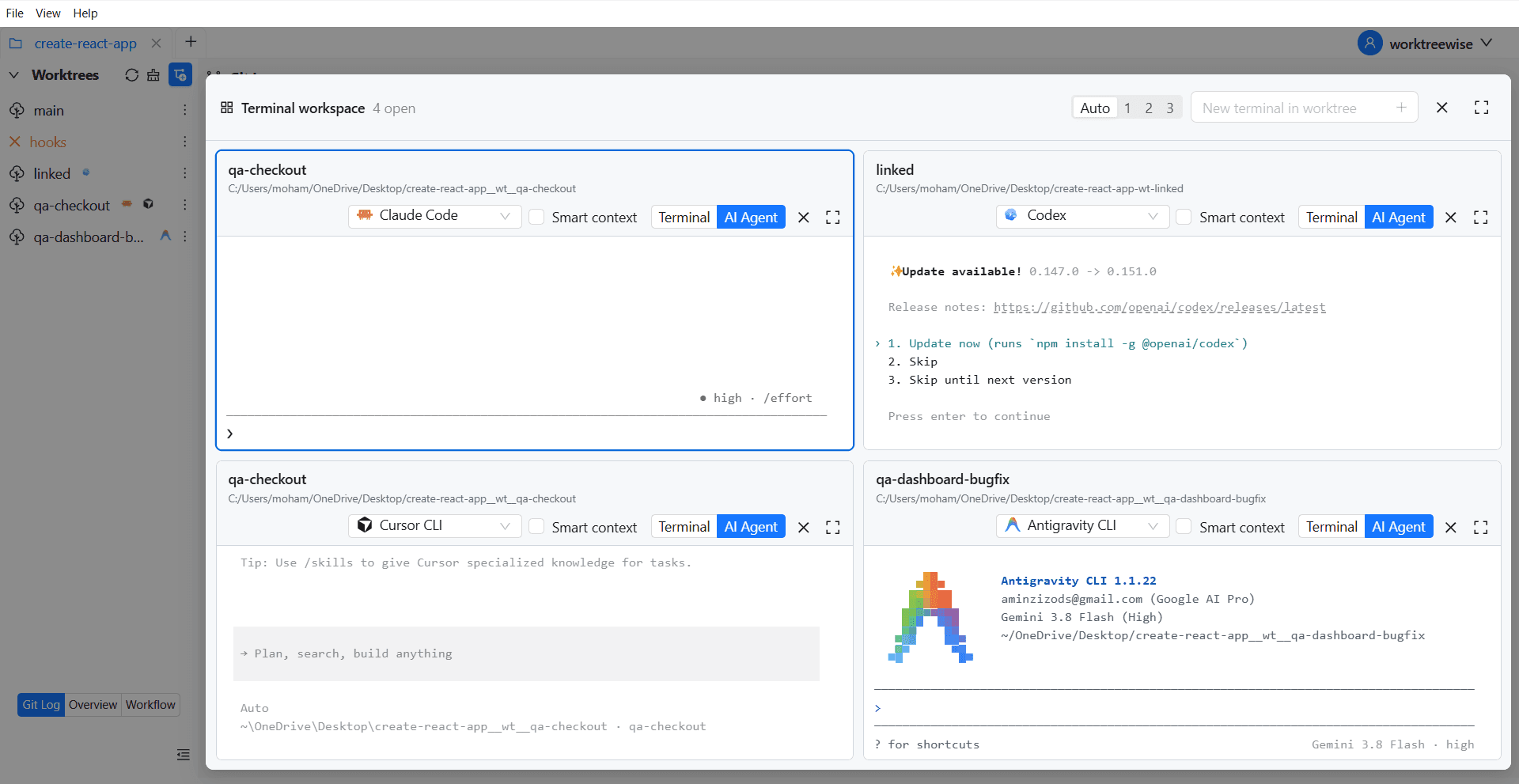
WorktreeWise eliminates the manual friction and mental overhead of CLI flags. It displays real-time branch states, uncommitted modifications, active terminals, and lock statuses across all worktrees on a single visual dashboard.
WorktreeWise Engineering Publication
Written and curated by the core WorktreeWise team. We build developer tools that turn Git worktrees, workflows, and parallel AI coding agents into second nature.