

Claude Code + worktrees
TL;DR: The 30-Second Summary
Running Claude Code in your primary checkout leads to uncommitted file clobbering, unexpected branch switches, and staging conflicts. By giving Claude Code its own dedicated worktree on an isolated branch, Claude can execute commands, install dependencies, and generate code without disturbing your active editor.
The Real-Life Scenario
“Sarah is deep into refactoring a React state machine when a critical dependency audit flags five vulnerabilities. Instead of interrupting her work and stashing changes, she launches Claude Code in a dedicated Git worktree (`../task-claude-deps`) on branch `agent/dep-upgrades`. Claude updates the lockfile and runs tests while Sarah keeps typing uninterrupted in her main IDE window.”
Autonomous AI CLI agents like Anthropic's Claude Code have transformed software engineering by reading repositories, running commands, and modifying code independently. However, running Claude Code in the same working tree where you are actively writing code is a recipe for chaos. Git worktrees solve this cleanly by decoupling agent execution into parallel directories.
Why AI Agents and Humans Collide in a Single Checkout
When Claude Code executes in your primary working tree, it performs filesystem writes, runs test runners, modifies `package-lock.json`, and stages Git changes. If you are editing files simultaneously, both you and the AI fight over the same files, language server processes, and Git staging index.
What you see in the terminal:
$ claude
> Updating dependencies in package.json...
error: Your local changes to 'src/App.tsx' would be overwritten by checkout.
fatal: Unable to create '/repo/.git/index.lock': File exists.Under the Hood: Git Plumbing & Architecture
Git uses an exclusive index lock file (`.git/index.lock`) whenever a staging or commit operation occurs. If an AI agent runs `git add` or `git commit` in the background while your IDE auto-saves or runs a Git plugin, lock contention crashes one or both processes. Worktrees eliminate this because each worktree has its own completely independent `.git/worktrees/<name>/index` file.
Quick Command Recipes
Copy and adapt these commands directly in your terminal:
Create dedicated worktree for Claude Code
Spawns a clean working directory and creates an isolated branch off main.
git worktree add ../task-claude-deps -b agent/claude-deps mainLaunch Claude Code inside the worktree
Launches the Claude Code interactive session scoped strictly to the new directory.
cd ../task-claude-deps && claudeReview Claude's work from your main repository
Compares Claude's commits against main without leaving your current workspace.
git diff main...agent/claude-depsStep-by-Step Practical Walkthrough
Follow these verified steps to safely resolve the issue and guarantee that your filesystem and Git references are in sync.
Create an isolated worktree and branch
Always give the agent a descriptive branch name prefix like `agent/` or `ai/`.
git worktree add ../claude-auth -b agent/auth-refactor mainPreparing worktree (checking out 'agent/auth-refactor') HEAD is now at 8b49e10 chore: release v1.2.0
Launch Claude Code inside the worktree directory
Open your terminal in the worktree folder and start Claude. Claude will only see and modify files in this directory.
cd ../claude-auth && claudeClaude Code v1.0.0 initialized. Scoped to /projects/claude-auth
Assign Claude a self-contained objective
Prompt Claude to implement the feature and run local verification tests before committing.
claude 'Migrate auth tokens to httpOnly cookies and run test suite'Running tests... 42 passed. Committed 2 changes to agent/auth-refactor.
Inspect and test in parallel
While Claude works, continue your normal development in your primary repository without interference.
Merge and cleanup
Once satisfied with Claude's commits, merge the branch into main and remove the temporary worktree.
git merge agent/auth-refactor
git worktree remove ../claude-auth
git branch -d agent/auth-refactorUpdating 8b49e10..3a11b9c Fast-forward
Edge Cases & Advanced Scenarios
Claude Code needs local environment variables (.env)
Remember that untracked `.env` files are not copied into new worktrees by default. Copy your `.env` or use a pre-worktree hook.
cp .env ../claude-auth/.envCommon Mistakes to Avoid
❌ Mistake: Letting Claude Code run on your current active branch
Why it causes trouble: Claude's commits mix with your uncommitted work, making rebasing and code review painful.
What to do instead: Strictly enforce 1 agent = 1 worktree = 1 isolated branch.
Verification Checklist
- ✓Claude Code working directory is outside your primary checkout
- ✓Git branch for Claude has a clear prefix (`agent/`)
- ✓No `.git/index.lock` collisions occur during concurrent development
Senior Engineering Tips
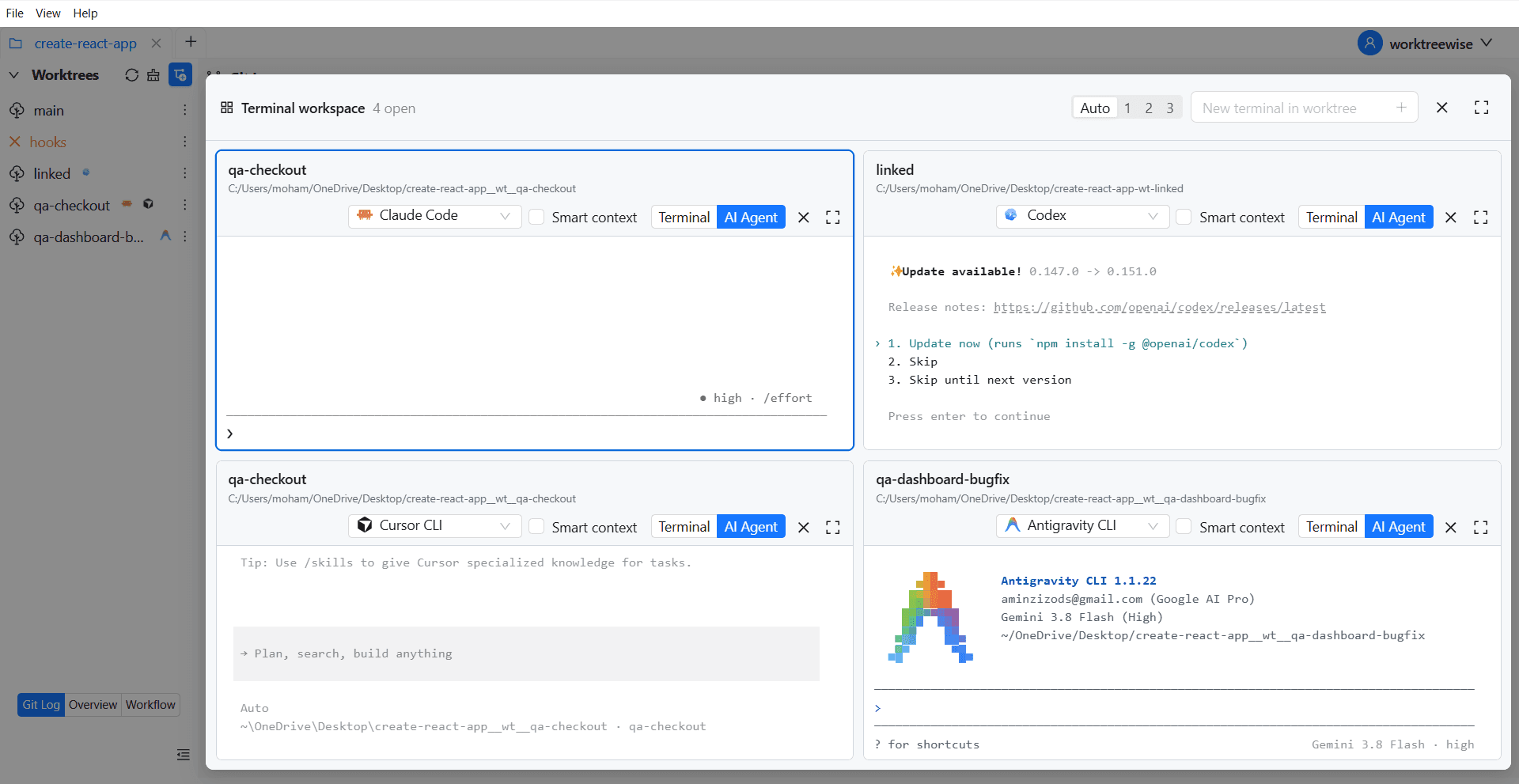
- ★In WorktreeWise, you can configure an AI Agent profile for Claude Code so that creating a worktree automatically launches Claude in an integrated terminal.
Key Takeaways
- 01.Running Claude Code in a separate worktree prevents index lock collisions and file overwrites.
- 02.Worktrees allow full parallel multitasking between human engineers and AI agents.
- 03.Cleanup is as simple as `git worktree remove` once the AI branch is merged.
How WorktreeWise Solves This Visually
WorktreeWise eliminates the manual friction and mental overhead of CLI flags. It displays real-time branch states, uncommitted modifications, active terminals, and lock statuses across all worktrees on a single visual dashboard.
WorktreeWise Engineering Publication
Written and curated by the core WorktreeWise team. We build developer tools that turn Git worktrees, workflows, and parallel AI coding agents into second nature.