

Exhausted by Git Stash? Transform Your Workflow with Git Worktrees!
Still relying on Git stash? Switch to Git worktrees and handle multiple tasks without losing changes or breaking your flow.
Read article
01 Dec 2025
5 min read
Modern QA teams face constant challenges: unstable environments, inconsistent builds, slow environment setup, and the difficulty of testing multiple feature branches locally. A reliable QA testing workflow requires stability, isolation, and fast switching between features yet most QA engineers still rely on branch switching, which often breaks the project.
Git worktrees offer the simplest, fastest solution for QA to create isolated test environments. Paired with WorktreeWise, QA engineers can set up clean environments instantly without touching Git commands.
This article explains why Git worktrees dramatically improve QA productivity, regression testing, and manual testing workflows, and how WorktreeWise makes them accessible even to non-technical QA profiles.
A typical QA workflow includes:
pulling feature branches
switching branches repeatedly
reinstalling dependencies
dealing with broken builds
unstable test data
environments that stop working
This results in:
inconsistent QA environment setup
slow manual testing processes
difficulty testing multiple features in parallel
unreliable regression testing
time wasted fixing the workspace instead of testing
QA shouldn’t struggle with Git conflicts or corrupted environments.
Git worktrees eliminate these issues completely.
A Git worktree is a separate folder linked to a specific branch, giving QA engineers a stable testing environment for each feature.
Think of it as:
a clean copy of the project
dedicated to one feature or bugfix
with its own environment and dependencies
This makes it ideal for:
manual testing
regression testing
validating pull requests locally
parallel testing workflows
QA environment isolation
Unlike traditional git checkout, worktrees let QA open multiple branches at the same time without breaking anything.
Isolated Environments for Every Feature QA can test every feature in a dedicated worktree, ensuring a clean and stable QA environment.
Test Multiple Features in Parallel
A dream for QA:
Feature A in one environment
Feature B in another
Bugfix C in a third
Perfect for parallel testing and faster release cycles.
Each worktree has its own environment. No conflicts, no corrupted builds.
QA can create a dedicated workspace for every reported issue making debugging and validation much faster.
QA can easily test PR branches locally in an isolated worktree without touching their main project.
Even badly broken branches stay isolated. Your main QA workspace remains stable.
Git worktrees are powerful, but Git commands are not QA-friendly.
WorktreeWise solves this by offering:
one-click environment creation
visual list of active test environments
easy delete/cleanup
quick switching between features
one-click open in IDE or terminal
GUI for branch selection
stable setup for manual and regression testing
This makes WorktreeWise an ideal QA productivity tool.
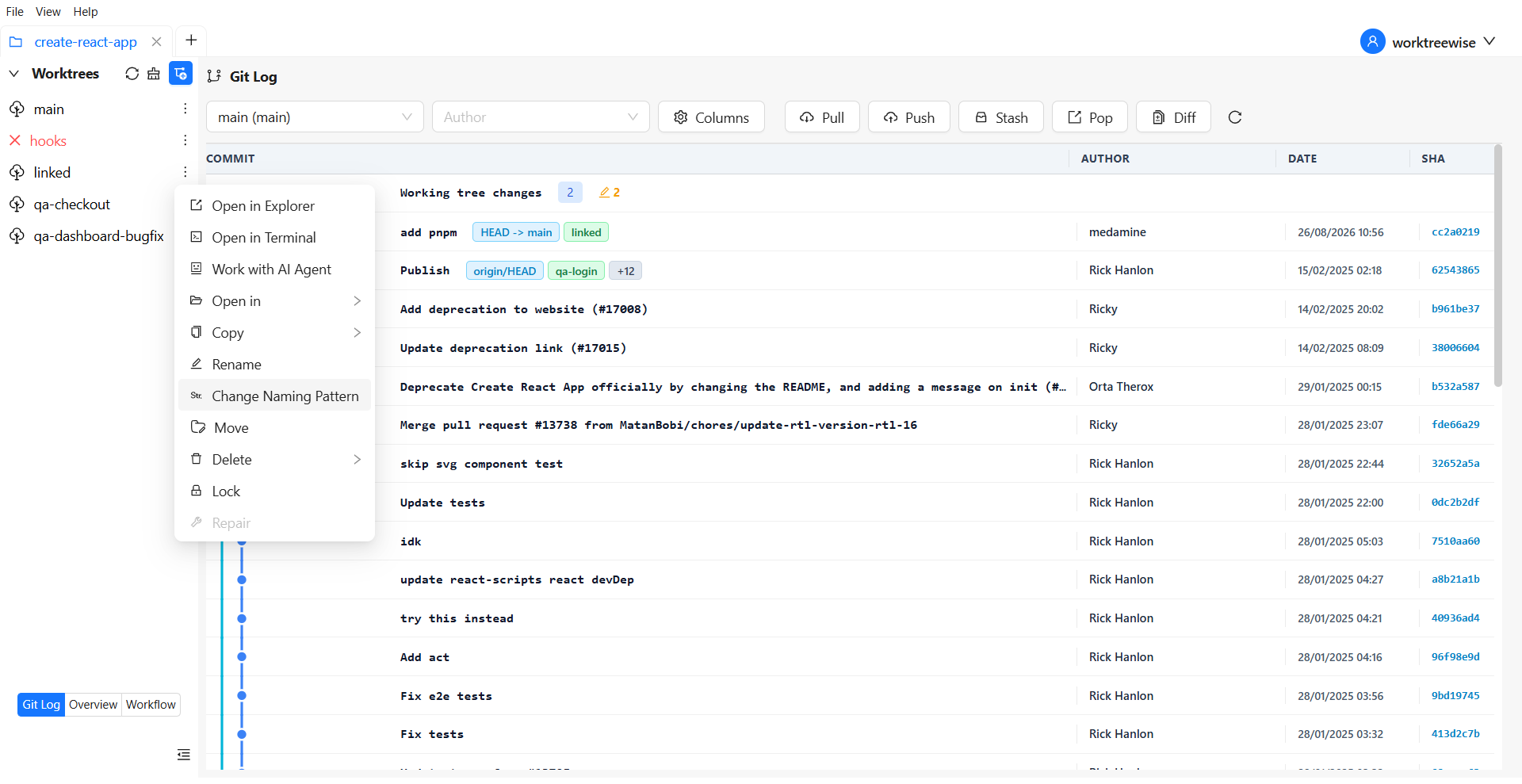
QA often needs clear naming for environments:
qa-login-feature
test-1234-checkout-flow
issue-555-regression
WorktreeWise lets you define a Worktree Naming Pattern:
{repo}__{branch}
{repo}-wt-{branch}}
wt__{repo}__{branch}
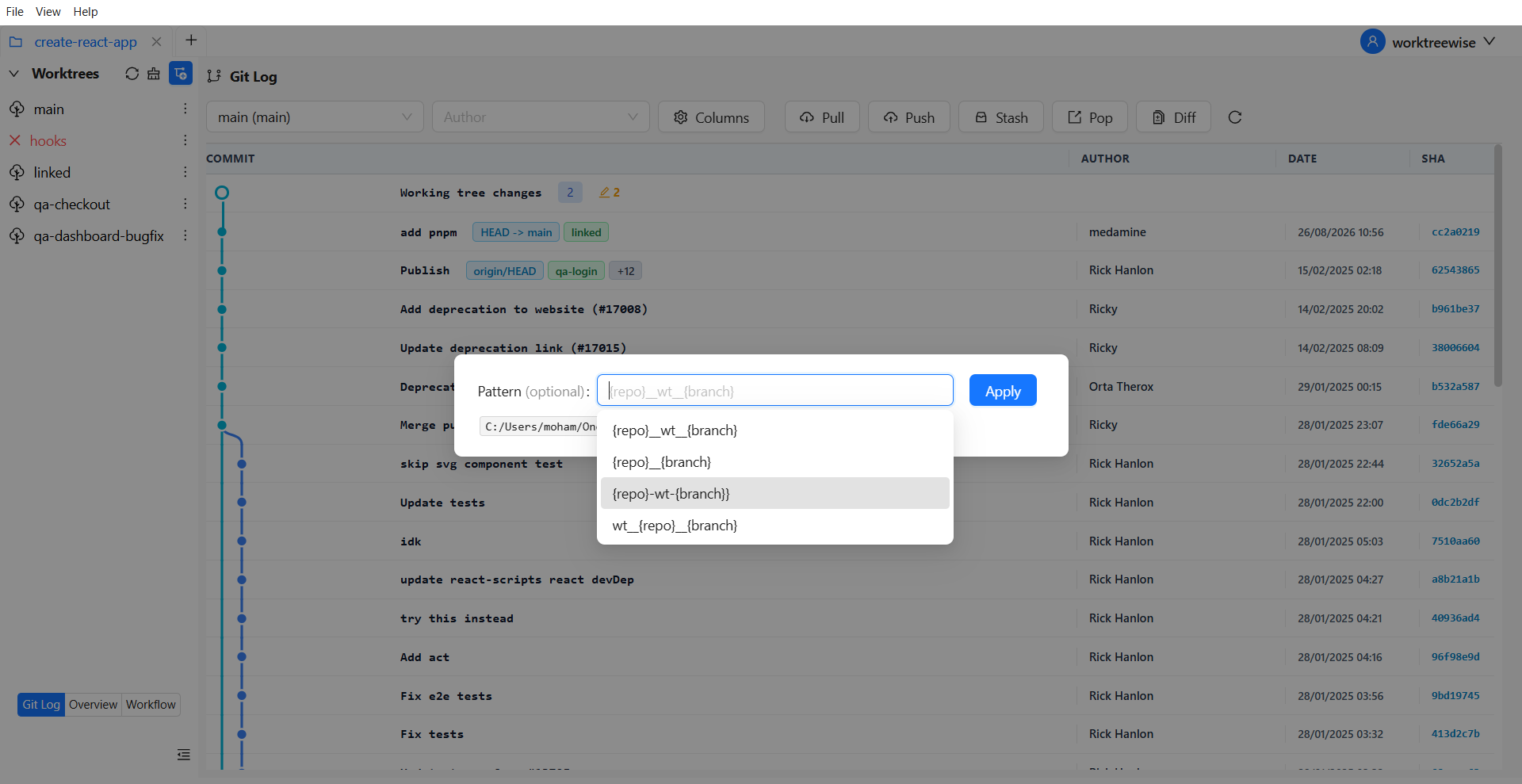
Benefits for QA:
easier tracking
cleaner parallel testing
faster environment switching
easier cross-team communication
A tidy workspace = faster, more reliable QA.
Imagine QA needs to test:
Login feature
Checkout redesign
Bugfix for the dashboard
In WorktreeWise:
Create worktree for feature/login
Create worktree for feature/checkout-ui
Create worktree for bugfix/dashboard-crash
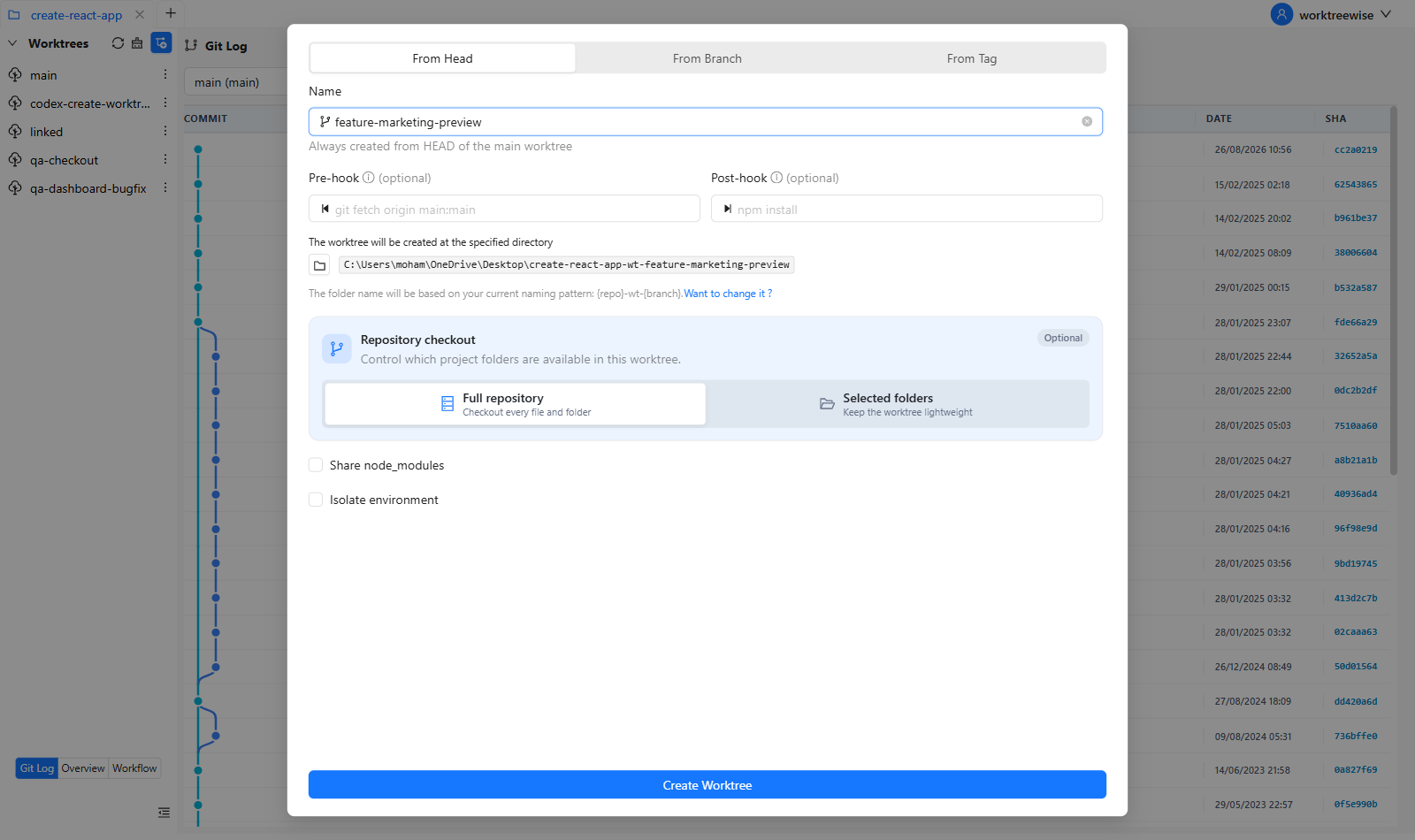
QA now has three isolated testing environments:
/qa-login
/qa-checkout
/qa-dashboard-bugfix
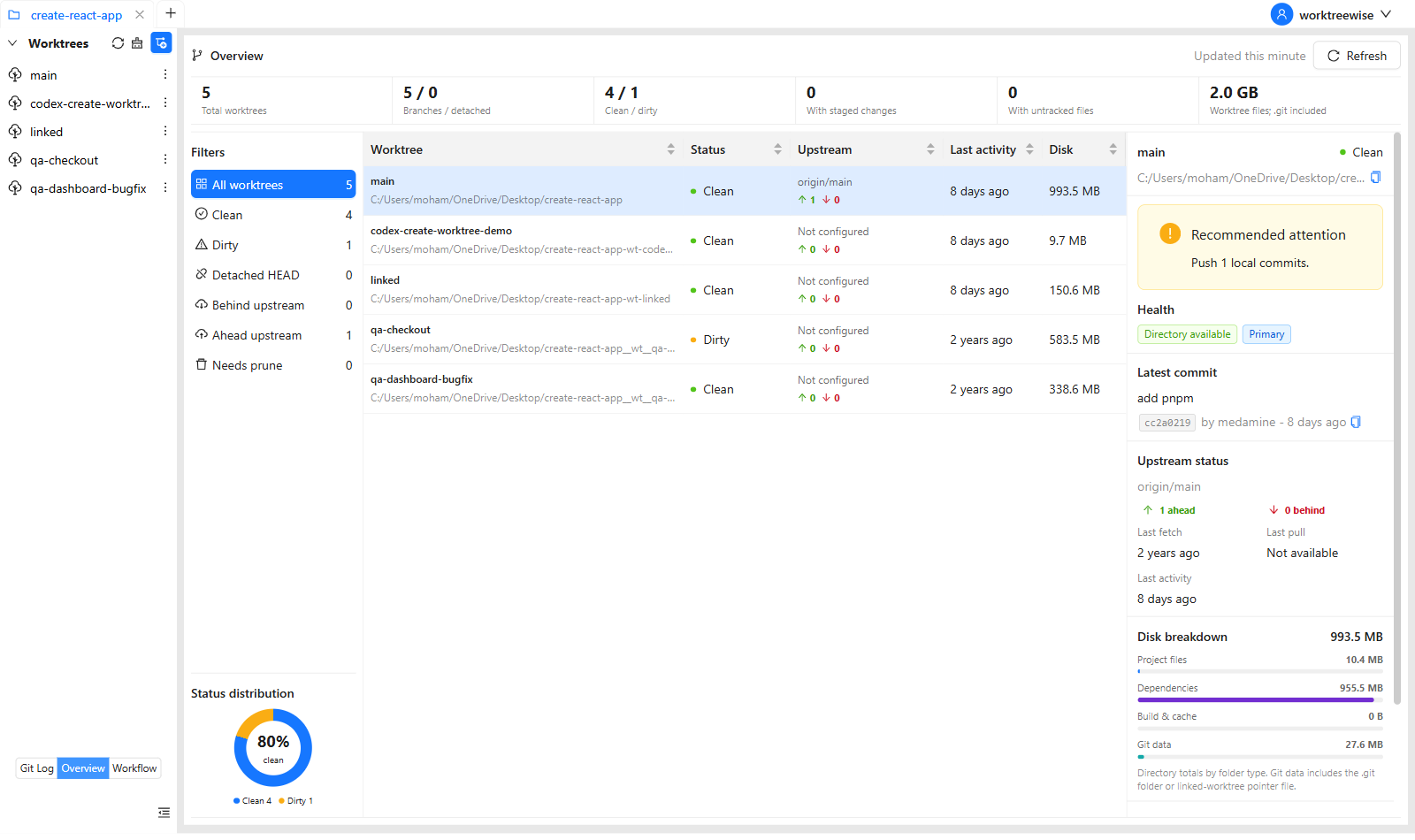
This setup is perfect for:
manual testing
UI validation
backend testing
regression runs
comparing behaviors across branches
And nothing breaks.
WorktreeWise allows workflows that run inside each worktree.
Useful QA workflows include:
run automated tests
run E2E test suites
linting
build commands
environment cleanup
starting backend + frontend
running API regression tests
loading mock data
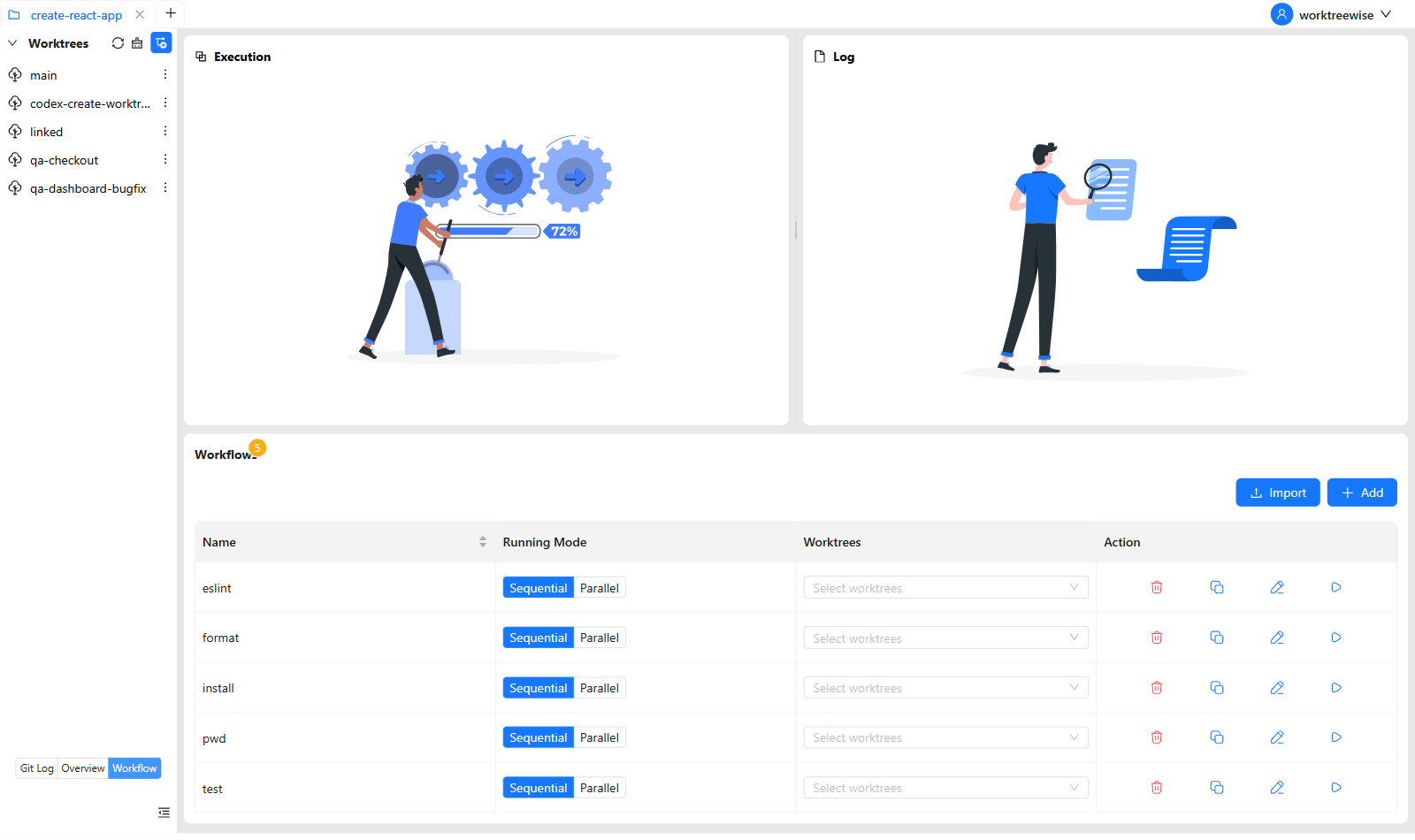
One click = consistent QA testing across environments.
This makes WorktreeWise a powerful tool for continuous QA testing.
For each feature or pull request:
Worktrees isolate checked-out files, but they do not automatically isolate databases, ports, containers, or external services. Give each environment explicit resources when tests can interfere with one another.
Create a WorktreeWise workflow containing your install, build, fixture, and test commands. QA can then run the same sequence against selected worktrees and use the execution logs as evidence of what ran.
Learn how WorktreeWise workflows run or start a free trial for your QA workflow.
QA teams need stable, isolated, and fast environments to test effectively. Git worktrees provide:
isolated test environments
parallel testing workflows
faster pull request validation
clean manual testing setup
reliable regression testing
zero environment conflicts
WorktreeWise brings this power to QA with a visual, intuitive interface no Git knowledge required.
Adopting worktrees with WorktreeWise is one of the best upgrades a QA team can make for speed, quality, and productivity.

AMMACH MOHAMED AMINE

AMMACH MOHAMED AMINE

AMMACH MOHAMED AMINE
Still relying on Git stash? Switch to Git worktrees and handle multiple tasks without losing changes or breaking your flow.
Read articleLearn how to use git worktree remove safely and effectively. Practical examples, common mistakes, and best practices for managing multiple worktrees.
Read articleLearn how to use git worktree prune to remove stale worktree references, fix broken states, and maintain a clean and efficient Git workflow.
Read article